- DATE:
- AUTHOR:
- The impact.com team
Check out our new help center, enjoy fresh AI capabilities, and more
A refreshed AI experience
ask impact has been redesigned with a modern, streamlined interface, built to deliver a more polished and intuitive AI experience. This update ensures ask impact reflects the intelligence and innovation behind the technology in keeping with modern UI and UX experience standards.
You’ll notice:
A cleaner, more modern interface
Improved usability and visual clarity
An enhanced AI product experience
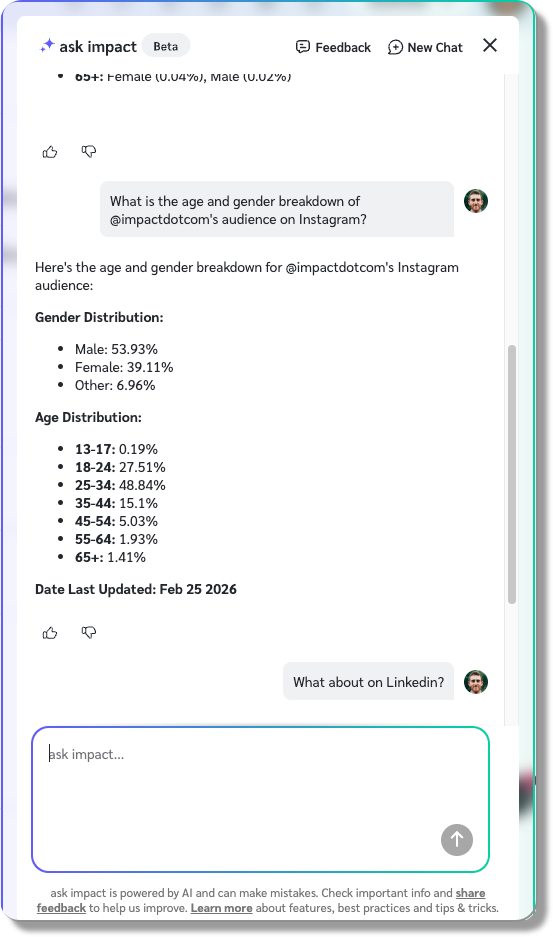
Publisher performance snapshot is now available in chat:
You can now retrieve a comprehensive overview of a publisher’s digital performance directly within ask impact. Instead of navigating across Instagram, YouTube, website, TikTok, and other properties individually, you can simply provide ask impact with the specific URL or handles and the platform with the metrics you need. Sit back and let ask impact deliver a holistic performance snapshot, including key metrics such as overall traffic, audience demographics, top-performing channels, and engagement rates. A few examples of direct questions in the chat look like this:
"What's the age and gender breakdown of @CareyOakey‘s audience on Instagram?”
“Show me the engagement metrics for Carey Oakey on www.careyoakey.com.”
“What is the bounce rate for www.careyoakey.com compared to www.dinahsoares.com? Is it higher on mobile or desktop?”
With a redesigned AI experience and powerful in-chat publisher insights, ask impact keeps getting faster, smarter, and built to scale with your needs.
Reach out to prospective partners in a snap with our Chrome extension
Are you using our Chrome extension yet? If not… I mean, we’re not gonna tell you how to do your job, but you should probably check it out. It tells you when there’s an impact.com partner account connected with the website or social profile you’re viewing, gives you all the information we have on that partner, and lets you add them as a prospect with a click. And if you’ve got an Email Workflow set up for prospecting (try the template Workflow “Automate prospect invites”), that one click will automatically begin sending those workflow emails on your behalf.
But that’s old news. What’s new today is that you now have the option to send an email directly, right from the extension. You can choose to use one of your existing Messaging Templates or draft something fresh. You can also choose which email address to send from — including your own, if you’ve connected it
Oh, and one more bonus note while we’re on the topic — the extension will now show you a little flag icon that tells you where that partner is based. It’s a quick way to confirm whether they’re geographically relevant for your program. And of course, you can always click over to the extension’s Audience tab to see where their followers are based as well.

Get answers faster than ever with our new help center
When you need answers, you need them fast — whether you’re troubleshooting, learning a new feature, or onboarding a teammate. Our updated help center is designed to get you to the right information quicker and more easily than ever before.
What’s new:
Faster performance — Pages load more quickly, so you can spend less time waiting and more time solving.
Improved mobile experience — A cleaner, more responsive design makes it easy to find answers from any device.
Smarter search — Enhanced search capabilities help you surface the most relevant content faster.
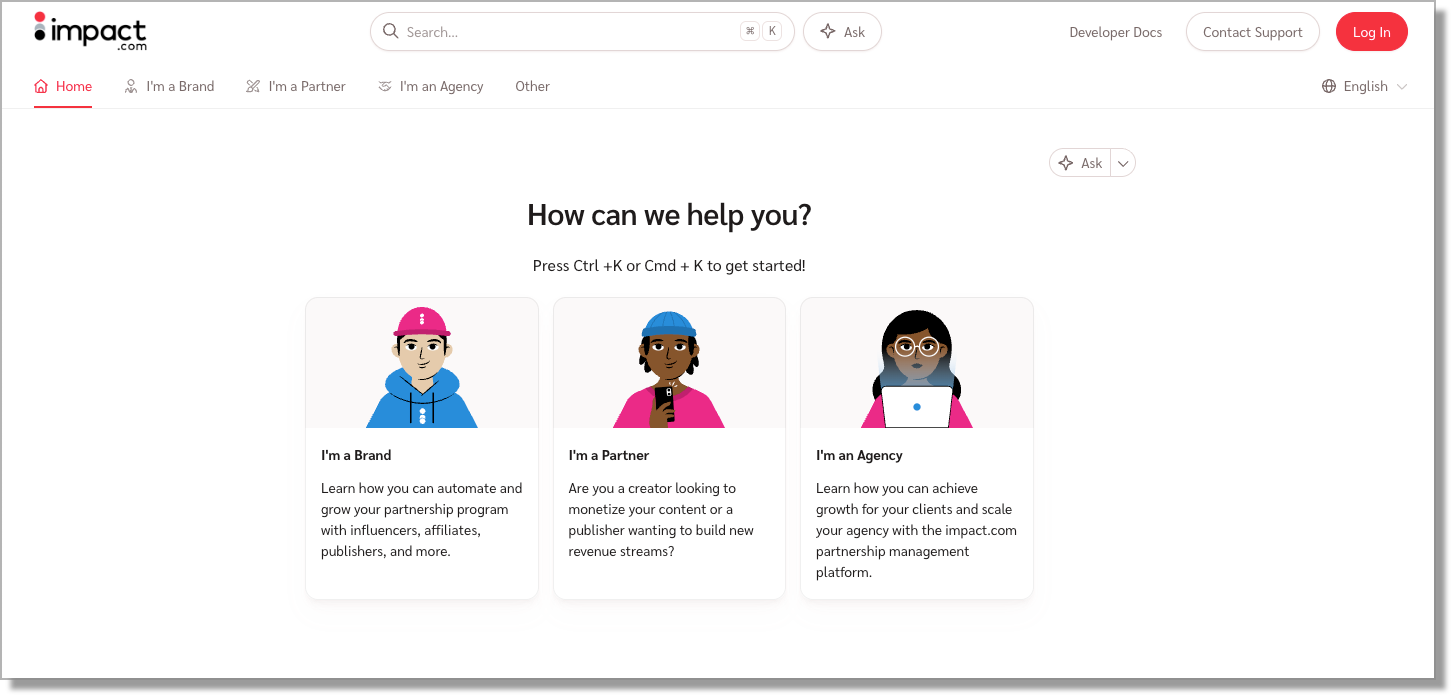
Ask AI — Get instant answers with our new AI assistant, trained directly on impact.com documentation and system knowledge.
It’s a more intuitive, responsive support experience — built to help you find answers with less friction. Check it out at help.impact.com.
Scale your catalog management with new automation tools
We’ve updated our Pull from URL catalog tools to give you more control and save your team time. Here’s how you can level up your data management:
Sync on your schedule: You can now select Weekly or Monthly syncs in the Pull from URL Fetch Frequency menu to match your actual update cycle.
Automate your workflow: Your technical team can now use the Advertiser Catalogs API to update your Pull from URL source link and refresh frequency programmatically. Stay in sync automatically without ever logging in to the UI.
Connect complex feeds: We’ve expanded the Pull from URL field to support up to 2,048 characters. Now you can use long, detailed data-feed URLs without worrying about length limits.
Close a tab in your brain by scheduling your Email Workflows
If you’re setting up a new Email Workflow — for instance, an email series that will get your partners hyped up to promote your next big promotion or product launch — you may have a specific idea about when you want those emails to be sent. Previously, you would have had to leave that workflow paused until you wanted it to become active. But that still left you with a little to-do item hanging over your head. And what’s the point of prepping these things early if you still have to remember to activate them later?
Now, you can schedule your Email Workflows to begin exactly when you want them to — so you can fully check that item off your list and know that your partners will get the info they need, when they need it.
Manage your blocked partners more easily
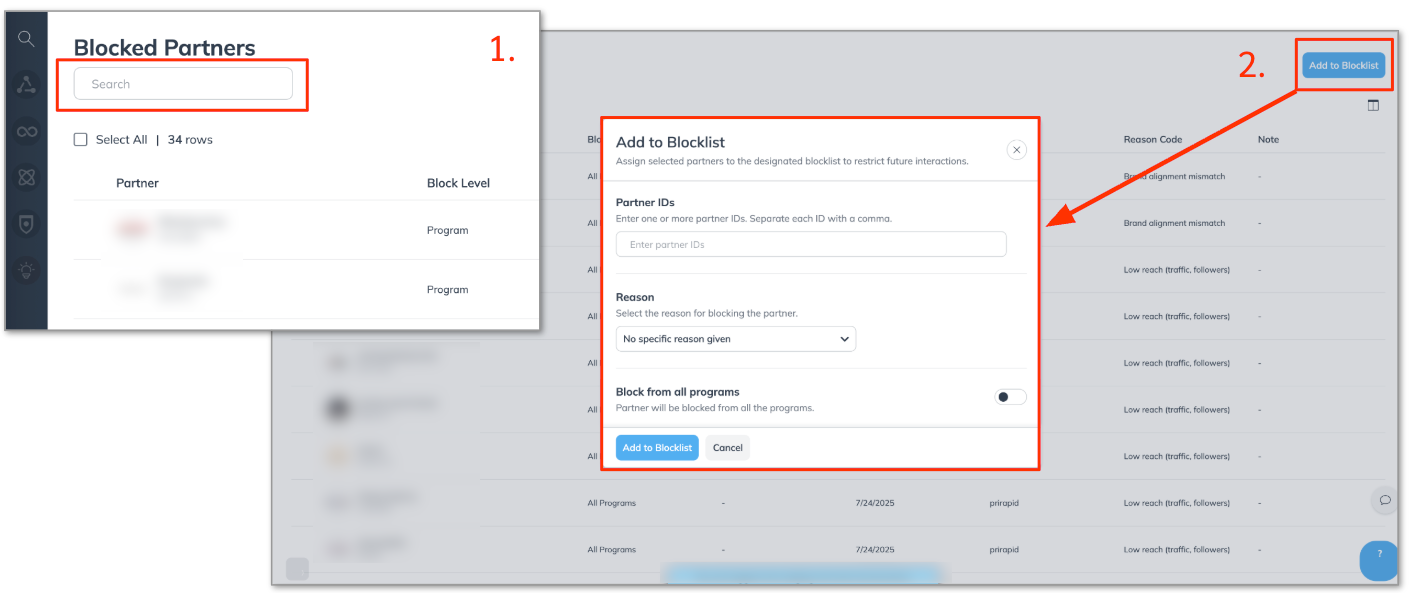
If you’ve ever had to decline a particularly persistent partner’s application several times, you may have already learned how to block a partner during the rejection process. We recently introduced a “Blocked Partners” screen that lets you see all the partners you’ve blocked and unblock them yourself, if you want to give them another chance.
With this release, we’re adding some improvements, namely:
We’ve added a search bar, so you can find the partner you’re looking for in a flash, even if you’ve got more blocks than Hakeem “the Dream” Olajuwon.
You can now block partners directly from this screen, rather than having to wait for their next application and blocking them as part of the rejection process.
Centralized unsubscribe management
We’ve introduced new capabilities to provide brands with clearer, more reliable control over unsubscribe data, reducing compliance risk and eliminating manual reconciliation workflows.
In addition, we’ve launched a new Unsubscribe Management API suite that allows brands to directly access and synchronize opt-out data with their internal systems. This creates a standardized, centralized source of truth for unsubscribe status.
Previously, exporting complete contact lists introduced regulatory risk and operational friction, requiring manual cross-referencing before every campaign send. With this update, brands can confidently exclude opt-out users instantly and maintain a secure, auditable unsubscribe record.
More control. Less risk. Built-in compliance support.
Filter out partner applications that don't meet your standards
If you have any specific criteria you’re looking for in a partner (for instance, they’re based in one of the regions you service), then you might find yourself spending a lot of time rejecting applications from partners who don’t meet those criteria. Now, if you get a little dopamine hit every time you click that reject button, we’re not here to judge (though maybe you should see someone and start working through some of that high school rejection trauma).
Most folks, however, find that a huge waste of time, so we’re here to help with that. We’ve added a new Application Workflow template, with the catchy title “Auto-Reject Non Qualifying Applications.” It’s quick to set up, and once you do, our system will automatically reject an applications that don’t meet your criteria.
Basically, it filters out all the applications that were going to be an obvious “no”, so you can focus on the “maybes” instead. And if enabling an automated workflow sounds intimidating, here’s the whole process as a 25-second GIF*:
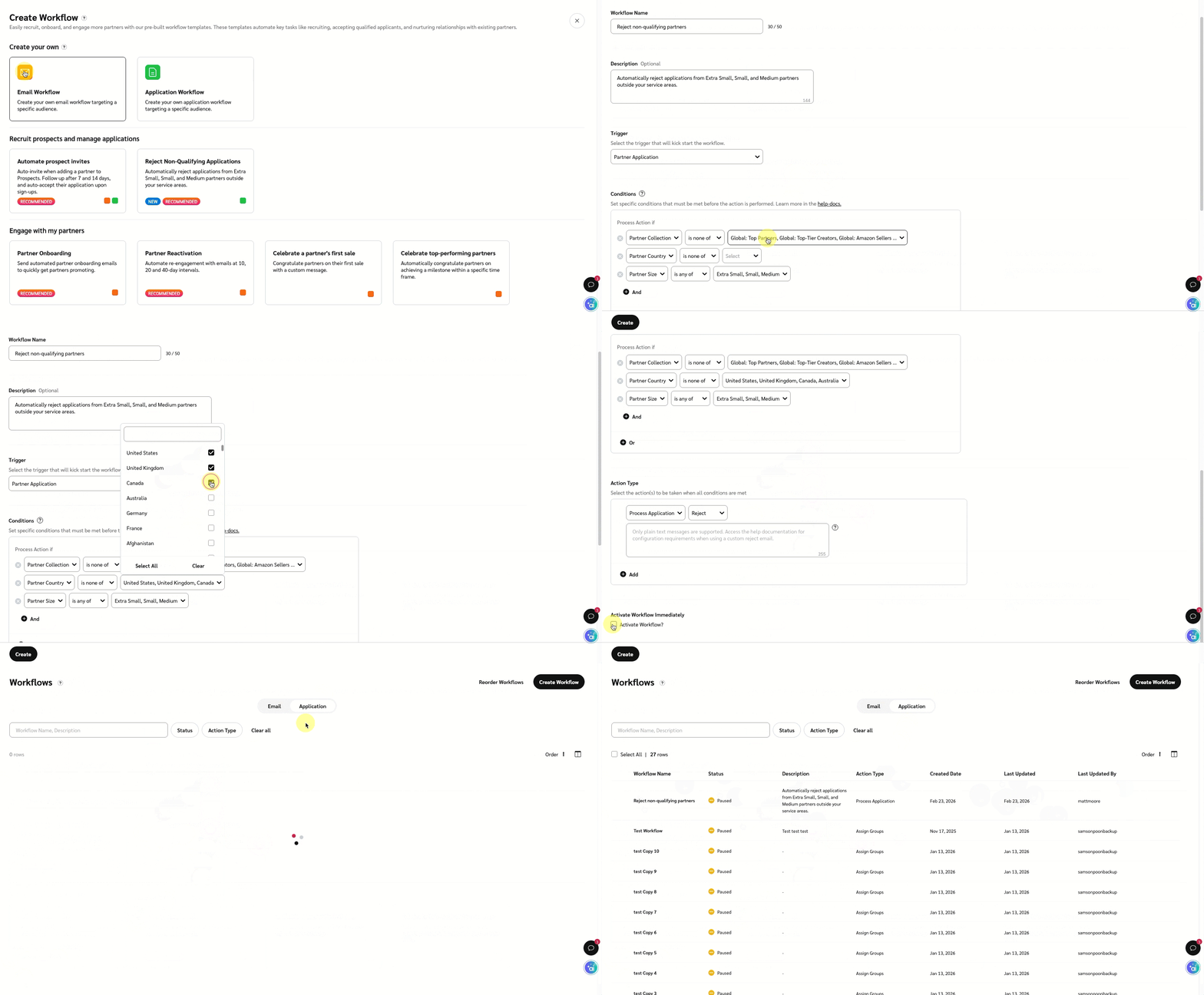
*That’s a hard “G”, in case you were wondering.
Easier password reset
If you’ve been using our platform for a while, you may have more than one username associated with your email address. And if that’s the case, you may have noticed that when you reset your password, you get a separate email for each username that’s connected to that email address.
We have now taught our “Forgot Password” system to send a single email, instead of one for each username. You’ll now see a list of all the accounts connected to your email address, and you can choose which password you want to reset.
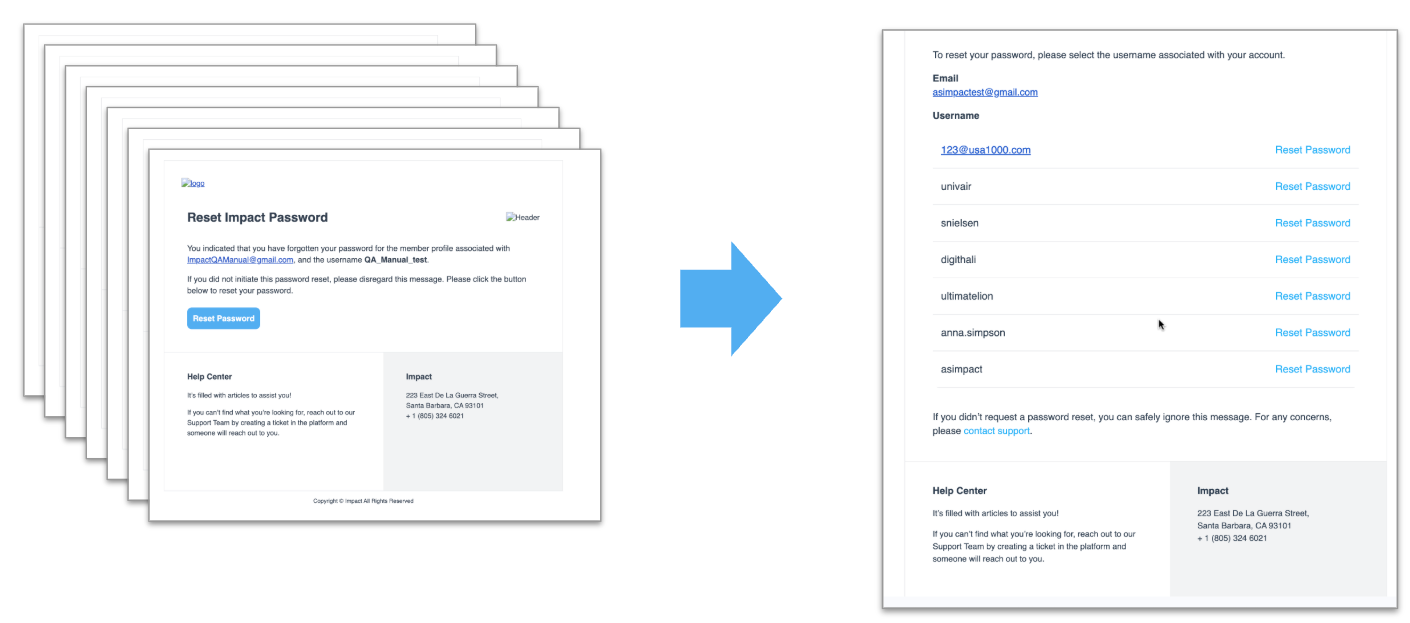
PS: You will only receive a password reset email if you sign into impact.com with a username and password. If you log in via SSO, you’ll have to handle that password reset process through your SSO provider (i.e. Apple, Google, X, Facebook, or LinkedIn).
PPS: We do have some good new for you SSO folks, actually. We have removed the two-factor authentication (2FA) requirement for SSO login. After all, you’re already doing the whole 2FA thing on the SSO provider’s side. There’s no extra security gained by having to do it again on our side — so now you don’t have to!
Enhanced segmentation: “Is Not” operator support
We’ve expanded segmentation capabilities within Outreach Workflows to provide more precise partner targeting. You can now use the “Is Not” operator on select partner fields, including Partner Group. This enhancement allows you to exclude specific partner groups directly within segment rules, giving you more flexibility when defining outreach audiences.
With this update, you can build more refined workflows without relying on workaround logic or manual filtering.
Phone Numbers feature deprecation
We’re continuing with the deprecation of the Phone Numbers feature.
This applies only to impact’s native Phone Numbers solution. Third-party call tracking integrations, including Invoca, remain fully supported, and you can continue to submit and track call events as usual.
Restricted Promo Codes deprecation
We’re continuing with the deprecation of the Restricted Promo Codes feature.
You will no longer be able to create or manage Restricted Promo Codes through this feature, but will be able to perform the same actions in the Promo Codes Exception Lists, which offer the same capability.
Heads up: We are sunsetting legacy API tokens
Security standards have evolved. Long-lived, all access tokens needed an upgrade to suit modern security standards, so we’re transitioning to Scoped API Tokens, a more secure and manageable way to control access. Here are some of the key dates and info you need to know:
March 31, 2026: Scoped Tokens will be required for all new integrations or credential resets.
Existing integrations using legacy tokens will continue to work without disruption.
Check out this help guide, and get started with Scoped API Access tokens today.
Partnerships Experience Academy: New (free) course!
The Complete Guide to Building a Creator-Affiliate Program on impact.com: In this course, join Coady Parenti, Director of Creator Consulting, to learn how to build, launch, and optimize a high-impact creator-affiliate program. Explore strategy, compensation, community, campaigns, and optimization, and gain actionable skills to design programs that drive measurable results.
Discover recruiting, motivating, and coaching creators, planning campaigns, and continuously optimizing performance. By the end, you’ll understand how to turn your creator network into a sustainable, revenue-driving channel.
Get ready for our fresh, new look
Since you’re clearly the sort of intelligent, suave, and — if you don’t mind us saying so — attractive person who reads all the way to the bottom of release notes, we’re going to let you in on a little secret: we’ve been working on a major refresh to our platform, and it’s coming soon.
You’ll notice an updated look and feel and a streamlined dashboard, but it’s more than just a coat of paint. We’ve rebuilt nearly every page in our platform using modern UI/UX tools, which will improve both performance (aka faster load times) and stability (aka fewer errors). Plus, we’ve redesigned many of those pages to be more intuitive and easier to navigate.
Here’s a sneak preview of the new look:
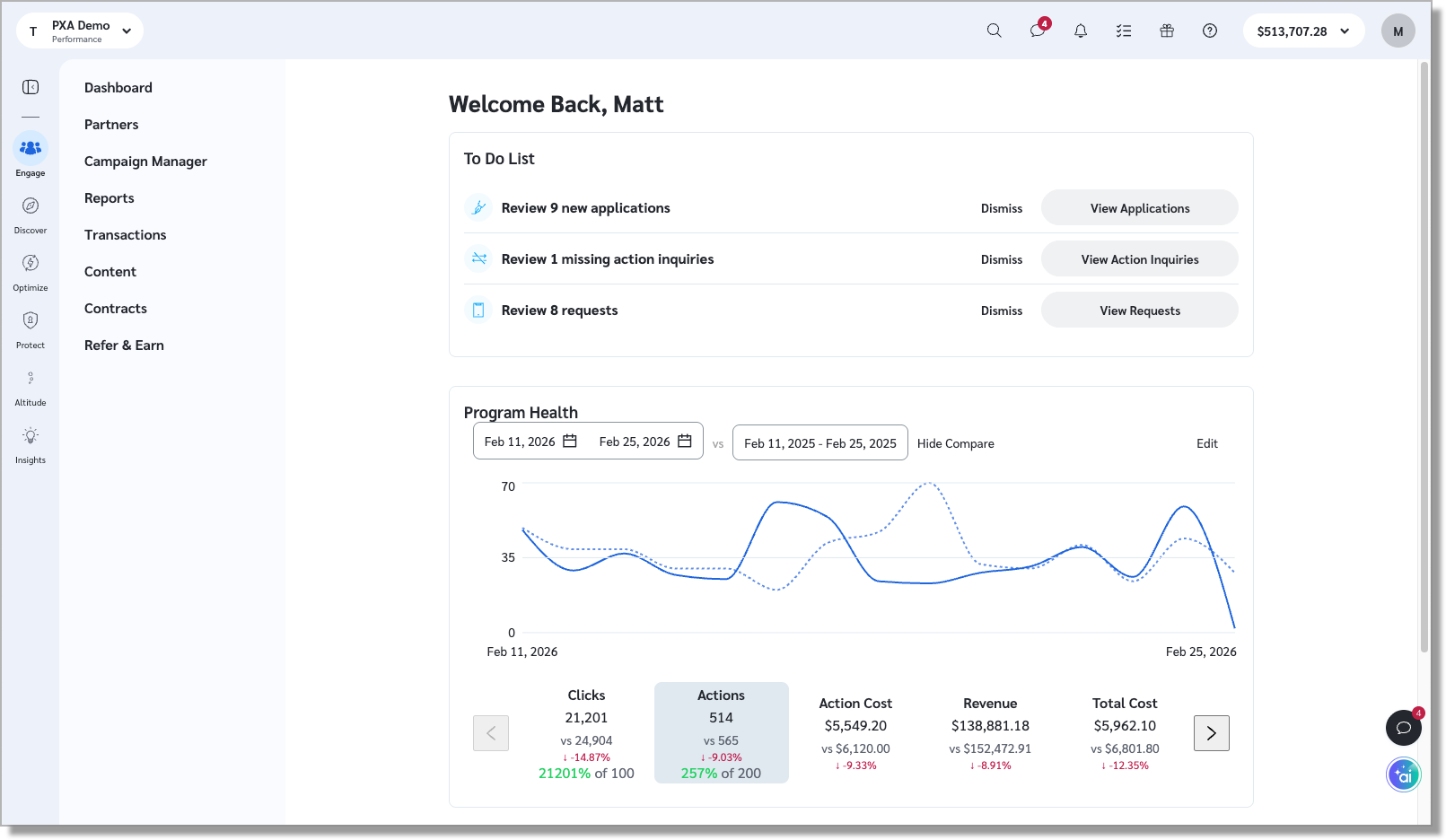
This is a big update, so we’ll be rolling it out in waves over the next few weeks. If you don’t want to wait, you can request early access using this form. Once you’re in, we’d love to hear what you think!
