- DATE:
- AUTHOR:
- The impact.com team
Q2 creator benchmarks are live! Also: creator-focused tools for brands selling on Amazon, and more
Ok, technically, I've still got a few more hours of July over here in the ol' Eastern Daylight Timezone. But as Jimmy Buffett might say...it's August somewhere.
Benchmark your program's Q2 creator performance
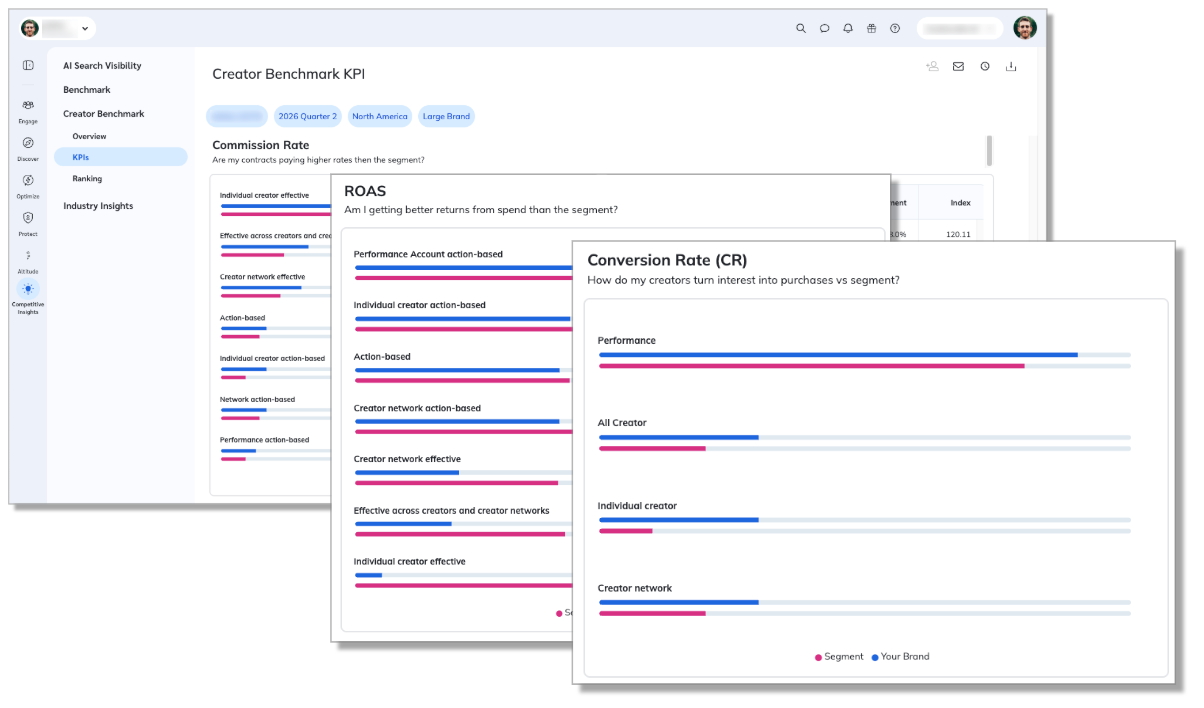
Setting commission rates for creators can feel like guesswork. So can figuring out which creators you should be working with but aren't. Creator Benchmarking gives you the competitive context to fix both: see how the creators in your program compare on commission rates, ROAS, and partner mix to creators in similar programs across your vertical.
Why check your benchmarks?
Know if you're paying right. Compare your effective commission rates and ROAS against the average for programs like yours. Spot the partner relationships where you're overpaying or underpaying, and adjust.
Find creators you're missing. Surface productive creators working in your vertical who aren't yet in your program, with the performance data to know they're worth the outreach.
Set targets you can defend. Use the benchmarks to set efficient commission rates and data-backed performance goals.
Availability: Creator Benchmarking is available to eligible brands that meet the vertical, regional, revenue, and partnership criteria. The reports cover the creator partners in your program, whether they're in your Performance (affiliate) program or a dedicated Creator program. Included with Essential, Pro, and Enterprise plans in the Competitive Insights section of your platform. For more information about the reports and how to use them, please check out our help documentation.
Your new partners are now way more likely to complete onboarding
We're introducing an upgraded sign-up flow for partners and creators. In early testing, brands saw 4x more partners complete their onboarding process!
The redesign shortens account creation to the essentials, then moves the rest into a simple checklist partners complete after they join. That means partners join your program faster, with less friction on their end. The new flow also flags which partners are Marketplace Verified, so you can spot who's already vetted at a glance.
No action is needed. Once the update reaches your account, new partners and creators will see the improved flow automatically.
Availability: We've started rolling this out across editions, and it'll reach all editions in the coming weeks.
Use creators to drive traffic and sales to your products on Amazon
Previously, only our Performance program functionality was available in Seller programs. But we kept hearing from brands that they wanted to primarily work with creators. So we've enabled allcreator program functionality inSeller for Amazon programs, including Creator Campaigns, Social Listening, and our Creator marketplace. Everything you use to run creator partnerships on DTC now works for Amazon.
Available in: All Seller programs. Premium features require a Creator Premium subscription.
Coming soon: See exactly where every newsletter stands, without the guesswork
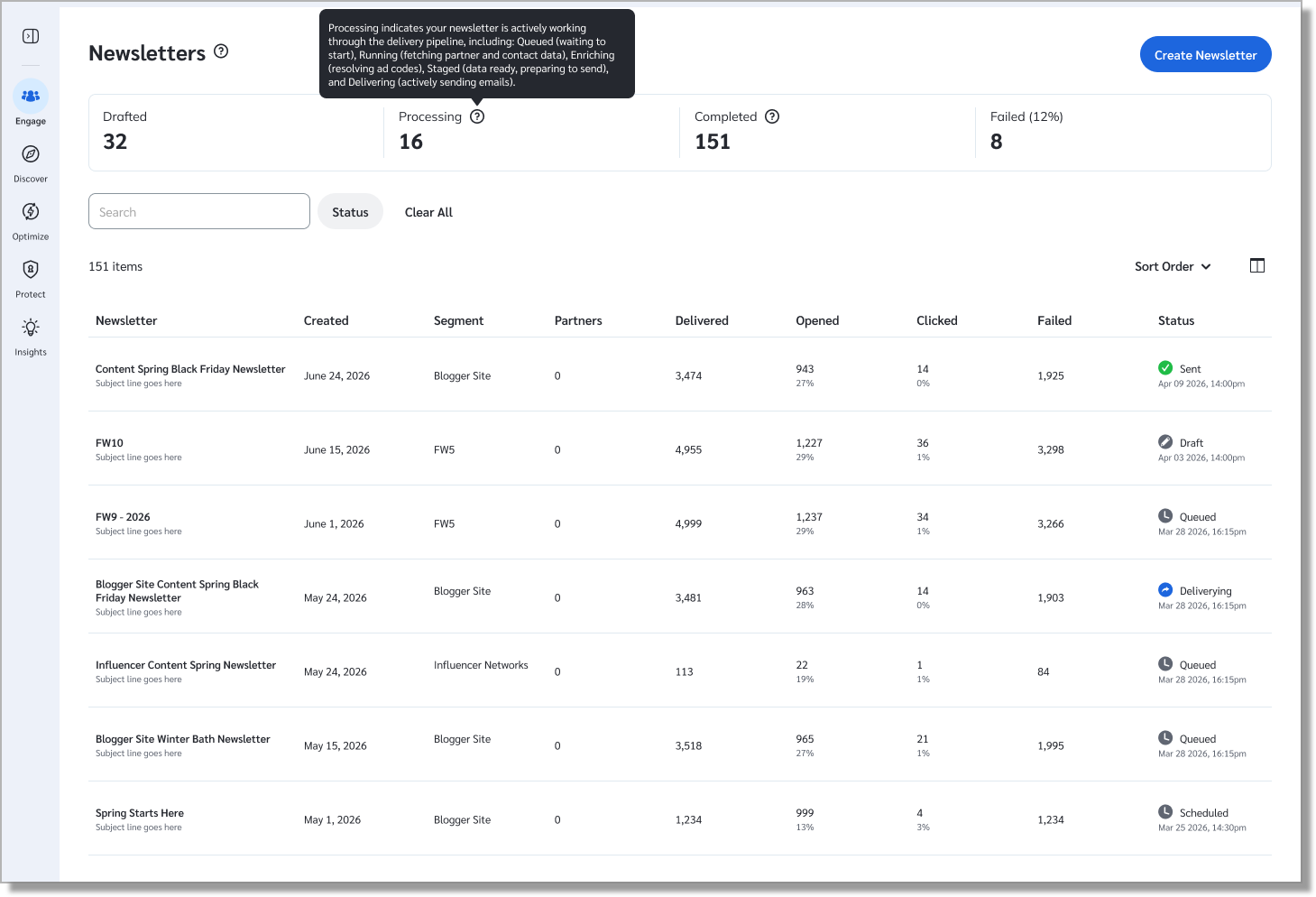
Sending a high-volume newsletter used to mean wondering if it was still running, whether everyone got it, or where in the pipeline it broke. All you had to go on was a name search and dense columns. Newsletters now group into four clear stages: Drafted, Processing, Completed, and Failed, rolling up 11 granular statuses like Running, Queued, Staged, Delivering, and Enriching, so you always know the health of your newsletter program at a glance.
Search by name, filter by stage, or drill into an in-flight status like Delivering, then clear it all in one click. Newsletters have actions such as View Report details for a full report breakdown (sent, opened, not opened) and an Issues Log Slideout showing the issues event history. Drafted newsletters can be edited and test-sent before you commit.
This capability is coming soon and will be available in the coming weeks.
Process partner applications via API
If you process applications through our API, you may know that you could already accept a pending contract programmatically, but only into the single program the partner applied to. To add that partner to your other programs, you had to drop back into the UI or piece it together with extra calls.
The Contracts endpoint now accepts an optional list of program IDs. Pass the programs you want, and the applicant is contracted to each one's public terms in the same call. That brings the API up to par with our in-platform application processing system, where accepting a partner into additional programs was already possible. The extra programs are processed in the background, so they won't appear in the immediate response.
Available in: Creator and Performance — all editions.
Social Listening auto-creation: stop re-entering hashtags
Manually re-entering campaign hashtags in Social Listening just to create a listener is a redundant double effort. Worse yet, if you forget the listener setup entirely, you won't be tracking any data. We heard this from too many brands. So we fixed it.
Now when you launch a campaign, we'll automatically creates a social listener with the same hashtags already in place. Your listener limit jumped from 5 to 50, and you can track up to 20 hashtags per listener instead of 10. More campaigns. More listening power.
Your listener stays active throughout the campaign and automatically pauses when it ends. You control your alerts and notifications, and we filter out generic hashtags like #ad, #sponsored, and #gifted. That's it. New campaigns create their listeners automatically, marked "Auto" in your dashboard.
Available in: Creator — all editions.
Heads up! Four reports are going away
Our new Creator Content & Campaign report consolidates four separate reports into a single location. As a result, we plan to deprecate the four reports it replaces—Performance by Campaign, by Post, by Platform, and by Creator—on October 1st.
If you rely on any of them, make the switch to Content & Campaign Overview today to avoid disruption.
Statement of Invoice: now speaks your AP department's language
Custom Due Date label on the SOI
The SOI's due date can't always be a single, clean date. Transaction due dates are set by the payment terms in each individual partner contract, which is why the SOI has always defaulted to "Due Upon Receipt." You can now update that label to better reflect the payment terms they actually use in their template terms: Net 30, Net 45, or otherwise.
One important note: this updates the label only. It has no effect on the underlying transactions in the document; those still follow the terms set out in each partner's contract.
Navigate to: Settings: Partner Fee Document Settings → Monthly Statement → Due Date Description
Abbreviated SOI document numbers
Some ERP systems enforce character limits and require unique document numbers, so a truncated number can fail validation entirely. You can now opt into an abbreviated SOI number format per billing group. It's shorter, but keeps the elements that keep it unique, so it clears ERP validation without breaking traceability.
Navigate to: Setting: Partner Fee Document Settings → Monthly Statement → Document Number
New in Advocate: No more W9 hurdle at signup for your partners
Your US referrers can now start earning without first filling out a W-9. We'll only collect tax info once a partner exceeds $2,000 in earnings for the year, which aligns with IRS thresholds. One less form standing between signup and that first payout.
Read the full rundown in our help doc.
Available in: Advocate — all editions.
Partnerships Experience Academy: New (free) courses!
Discover & Recruit Course: Finding the right partners shouldn't take hours of manual research, disconnected tools, and spreadsheet management. This course shows you how to use impact.com's partner discovery and recruitment tools to build a structured, scalable recruitment process.
Explore the Partner Marketplace, Creator Search, and impact AI recommendations to find partners that fit your program goals. Then organize your prospects, import lists in bulk, message and email potential partners, send proposals, and manage applications, all inside the platform.
