- DATE:
- AUTHOR:
- The impact.com team
See how your brand shows up in AI answers, get live help from ask impact, and more
AI Search Visibility Reports: See where you stand and activate the voices shaping AI answers
A sizable portion of what AI models use to build their answers comes from the trusted content of creators and affiliates. Which means the brands that show up in AI answers will be the ones activating those voices through partnerships.
Our new AI Search Visibility Reports, powered by data from Evertune, a leading Generative Engine Optimization platform, show you which brands top LLMs name in your category, and which publishers they source to get there. So you can see where you stand and how to improve your visibility through partnerships.
Two reports are now available:
Brand Index scores the brands appearing in AI answers in your category across ChatGPT, Google AI Overviews, and Microsoft Copilot, split into how often each brand appears and where it ranks so that you can tell a visibility problem from a position problem.
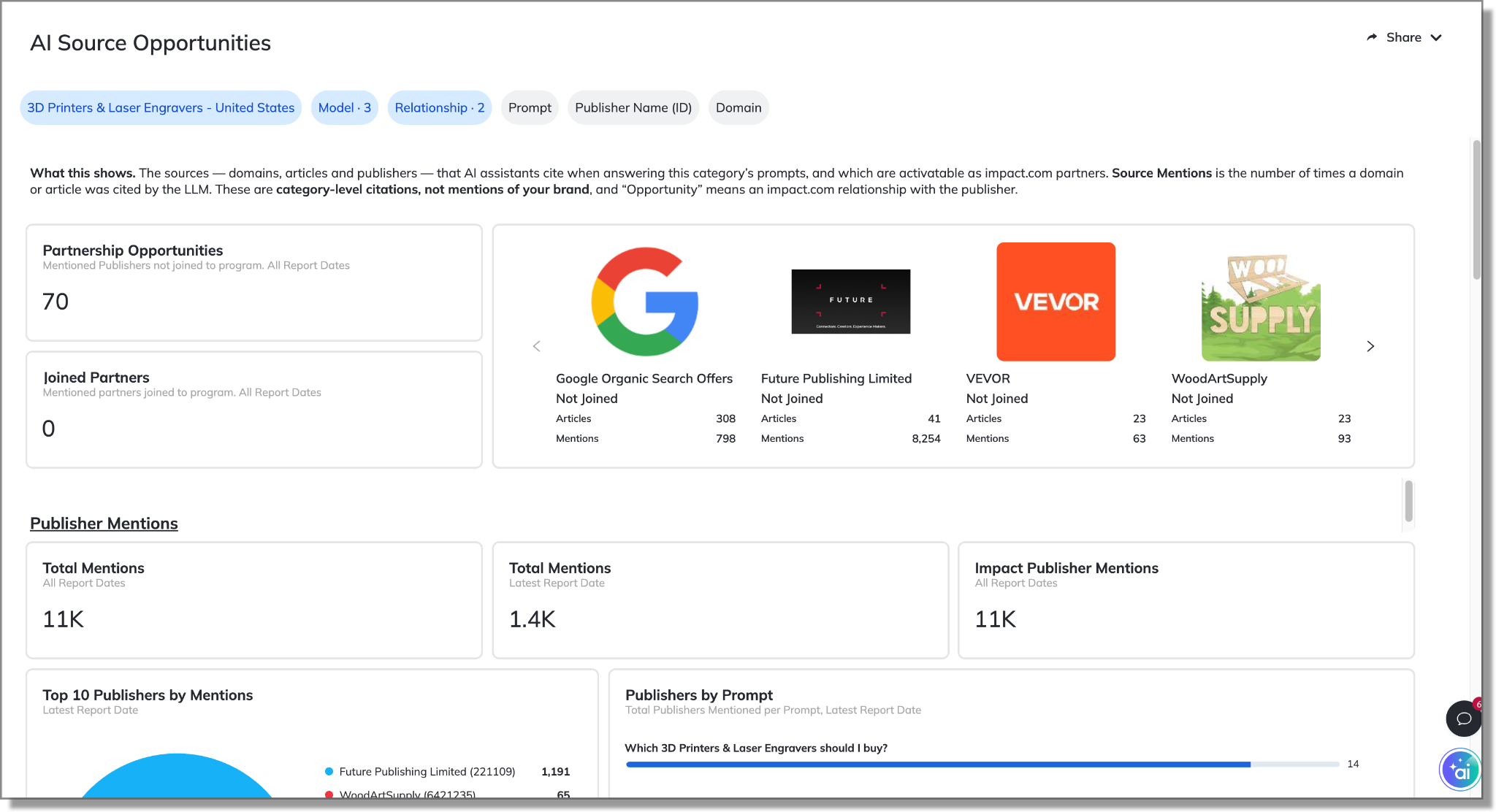
AI Source Opportunities names the domains and articles that those models cite, and tags every publisher as already in your program, on impact.com but not joined, or not on the platform yet. Send a proposal without leaving the report using the partner slide-out.
To learn more about these game-changing new reports, check out our help docs.
Available as a paid add-on in: Performance – Essentials, Pro, and Enterprise.
Fewer tabs, more answers. The latest with ask impact
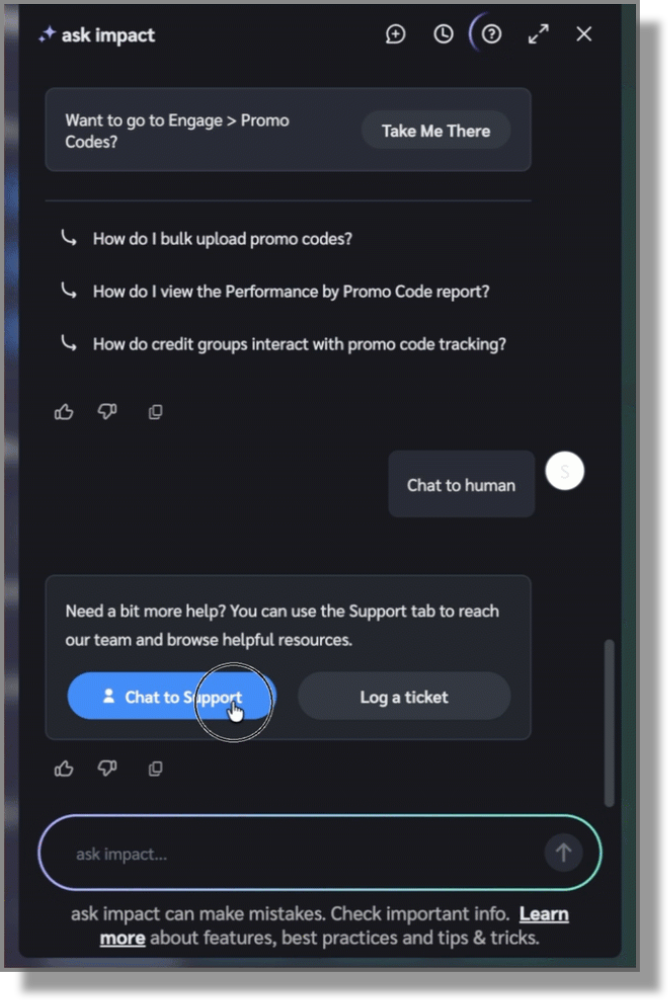
You ask a question, hit a wall, and open another tab. In this cycle, we closed a few of those. When you need a person, ask impact hands you to a live agent with a summary of your chat attached, so no one asks you to repeat yourself. Share files both ways, up to five per message at 25 MB. One live chat at a time, as many issues as you want inside it, and an optional rating when you’re done. Live chat access is required for this one.
Advocate program? ask impact now speaks Advocate. Ask how many referrals you got last month and get program-level numbers. Ask strategy questions and get answers grounded in impact.com’s referral-marketing guidance with PXA course recommendations.
Account admins can also ask who has access to your account and remove users right from the chat. ask impact confirms before it removes anyone, so nobody gets surprised.
Brands can ask to list partners, and filter on program, country, status, and membership. Check whether you’re partnered without opening the My Partners page.
Available in:
All Performance editions.
Creator Essentials and Premium editions.
Partners can now find your campaigns by describing what they want
Partners used to find your campaign only if what they typed matched your campaign or brand name. Now they can describe what they're after in plain English. Search returns campaigns that fit, even when their exact words aren't in your listing.
Search reads your campaign name, description, category, "who we're looking for," compensation type, tasks, platforms, and content guidelines. The more specific those fields are, the more ways partners have to find you.
Partners only see campaigns they're eligible for, so your eligibility settings still apply. This covers Performance and Creator campaigns.
Learn more in the help docs.
Available in: All editions.
Preview your campaign from the view of creators and partners
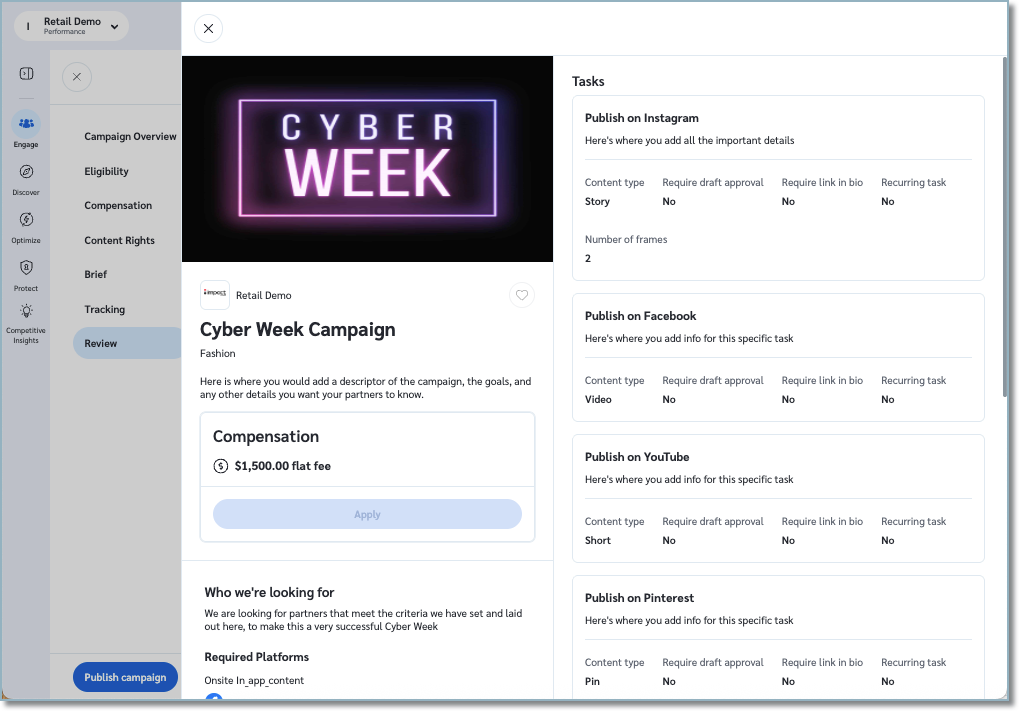
Until now, the Review step was your last look at a campaign before publishing. It couldn't show you what a creator or partner actually sees when they find your campaign in the marketplace.
Now it can. At the end of the campaign builder, select Preview as creator (creator campaigns) or Preview as partner (performance campaigns). A slide-out opens with your campaign as an eligible creator or partner would see it, including any links you added to content guidelines or task instructions, which are clickable.
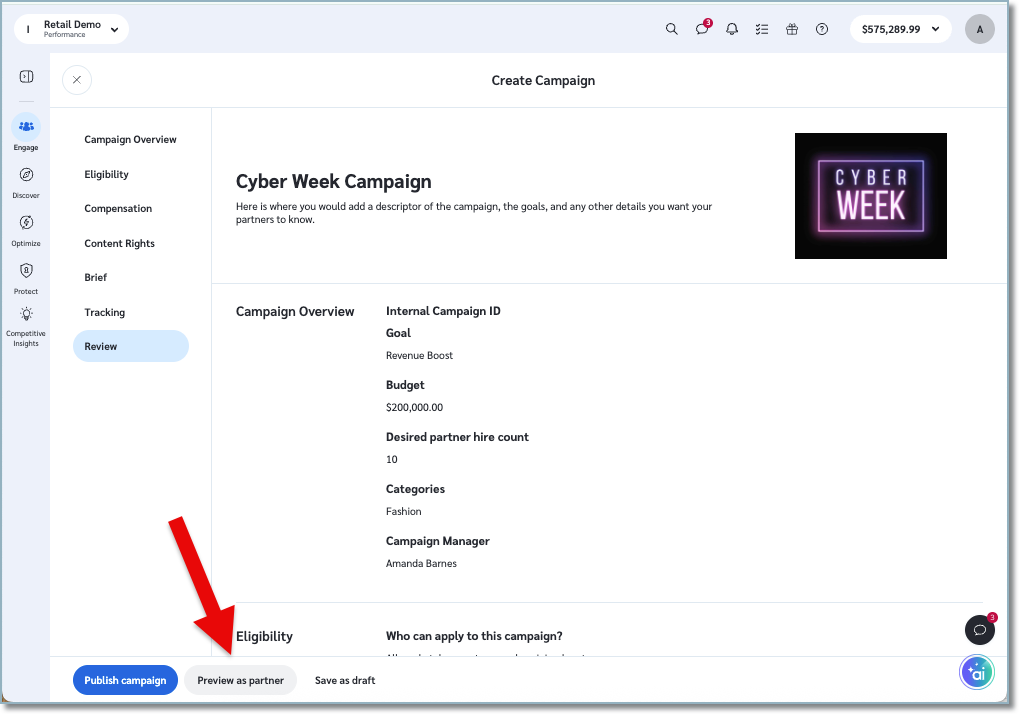
The preview shows your campaign exactly as you entered it. Close the slide-out with the X in the top left before you publish or save as a draft.
Learn more in the help docs.
Available in: All editions.
Cleaner numbers when campaigns overlap
Each order is now credited to a maximum of one campaign only: Performance or Product Boost. That means no double-counting in your reports, and no double payouts when more than one campaign touches the same order. To learn more about how campaign attribution works, please review our help documentation.
Available in: All editions.
Product Marketplace now stays in step with your catalogs
Partners now see products from active catalogs only, so anything from a pending or inactive catalog stays out of the Product Marketplace. Reactivate a catalog and its products come back. On Manage Catalogs, a new status column shows when a catalog is Activating or Deactivating, and the upload status column is now called Processing State.
Available in: All Performance editions.
Turn on technical partners without a dev project
Adding a tech partner to your site normally means dev work you have to queue and wait for. The Partner Integrations Hub removes that step: if you run the impact.com universal tracking tag (UTT), you can activate approved tech partners yourself, from your account settings, with no new code from your developers.
The tag is already on your pages, so the hub uses it to load a partner's approved script for you. That turns setup into a form: pick the partner, enter the single identifier they give you (a site ID or domain), and publish.
Today that covers cart recovery, on-site conversion, connected TV, and now connected audio. Audiohook is the newest tech partner to join the hub, reaching listeners across podcasts, streaming audio, and digital radio, with conversions tracked through the tag you already have. See how it performs for your brand today.
Availability: All brands that run the impact.com universal tracking tag (UTT).
Your Statement of Invoice report, one click away
A little enhancement that we are sure will go a long way. The Statement of Invoice listing report is now linked straight from the Partner Payments Invoices screen under Documents. No more hunting through More Reports to find it.
Available in: All Performance editions.
Partnerships Experience Academy: New (free) courses!
Crediting and Contracting Course: Every impact.com partnership runs on a contract. It defines what a partner earns, when they earn it, and how long the agreement lasts. This course shows you how to use the platform’s full contracting toolkit.
Get a solid foundation with template terms - the building blocks of every partner agreement. Demystify commission structures that pay partners for the value they bring, and learn how to add custom terms where you need them. You’ll also discover how to update a live contract or review its full history whenever a question comes up.
AI Search Visibility Reports: See where you stand and activate the voices shaping AI answers
A sizable portion of what AI models use to build their answers comes from the trusted content of creators and affiliates. Which means the brands that show up in AI answers will be the ones activating those voices through partnerships.
Our new AI Search Visibility Reports, powered by data from Evertune, a leading Generative Engine Optimization platform, show you which brands top LLMs name in your category, and which publishers they source to get there. So you can see where you stand and how to improve your visibility through partnerships.
Two reports are now available:
Brand Index scores the brands appearing in AI answers in your category across ChatGPT, Google AI Overviews, and Microsoft Copilot, split into how often each brand appears and where it ranks so that you can tell a visibility problem from a position problem.
AI Source Opportunities names the domains and articles that those models cite, and tags every publisher as already in your program, on impact.com but not joined, or not on the platform yet. Send a proposal without leaving the report using the partner slide-out.
To learn more about these game-changing new reports, check out our help docs.
Available as a paid add-on in: Performance – Essentials, Pro, and Enterprise.
Fewer tabs, more answers. The latest with ask impact
You ask a question, hit a wall, and open another tab. In this cycle, we closed a few of those. When you need a person, ask impact hands you to a live agent with a summary of your chat attached, so no one asks you to repeat yourself. Share files both ways, up to five per message at 25 MB. One live chat at a time, as many issues as you want inside it, and an optional rating when you’re done. Live chat access is required for this one.
Advocate program? ask impact now speaks Advocate. Ask how many referrals you got last month and get program-level numbers. Ask strategy questions and get answers grounded in impact.com’s referral-marketing guidance with PXA course recommendations.
Account admins can also ask who has access to your account and remove users right from the chat. ask impact confirms before it removes anyone, so nobody gets surprised.
Brands can ask to list partners, and filter on program, country, status, and membership. Check whether you’re partnered without opening the My Partners page.
Available in:
All Performance editions.
Creator and Advocate editions
Partners can now find your campaigns by describing what they want
Partners used to find your campaign only if what they typed matched your campaign or brand name. Now they can describe what they're after in plain English. Search returns campaigns that fit, even when their exact words aren't in your listing.
Search reads your campaign name, description, category, "who we're looking for," compensation type, tasks, platforms, and content guidelines. The more specific those fields are, the more ways partners have to find you.
Partners only see campaigns they're eligible for, so your eligibility settings still apply. This covers Performance and Creator campaigns.
Learn more in the help docs.
Available in: All editions.
Preview your campaign from the view of creators and partners
Until now, the Review step was your last look at a campaign before publishing. It couldn't show you what a creator or partner actually sees when they find your campaign in the marketplace.
Now it can. At the end of the campaign builder, select Preview as creator (creator campaigns) or Preview as partner (performance campaigns). A slide-out opens with your campaign as an eligible creator or partner would see it, including any links you added to content guidelines or task instructions, which are clickable.
The preview shows your campaign exactly as you entered it. Close the slide-out with the X in the top left before you publish or save as a draft.
Learn more in the help docs.
Available in: All editions.
Cleaner numbers when campaigns overlap
Each order is now credited to a maximum of one campaign only: Performance or Product Boost. That means no double-counting in your reports, and no double payouts when more than one campaign touches the same order. To learn more about how campaign attribution works, please review our help documentation.
Available in: All editions.
Product Marketplace now stays in step with your catalogs
Partners now see products from active catalogs only, so anything from a pending or inactive catalog stays out of the Product Marketplace. Reactivate a catalog and its products come back. On Manage Catalogs, a new status column shows when a catalog is Activating or Deactivating, and the upload status column is now called Processing State.
Available in: All Performance editions.
Turn on technical partners without a dev project
Adding a tech partner to your site normally means dev work you have to queue and wait for. The Partner Integrations Hub removes that step: if you run the impact.com universal tracking tag (UTT), you can activate approved tech partners yourself, from your account settings, with no new code from your developers.
The tag is already on your pages, so the hub uses it to load a partner's approved script for you. That turns setup into a form: pick the partner, enter the single identifier they give you (a site ID or domain), and publish.
Today that covers cart recovery, on-site conversion, connected TV, and now connected audio. Audiohook is the newest tech partner to join the hub, reaching listeners across podcasts, streaming audio, and digital radio, with conversions tracked through the tag you already have. See how it performs for your brand today.
Availability: All brands that run the impact.com universal tracking tag (UTT).
Your Statement of Invoice report, one click away
A little enhancement that we are sure will go a long way. The Statement of Invoice listing report is now linked straight from the Partner Payments Invoices screen under Documents. No more hunting through More Reports to find it.
Available in: All Performance editions.
Partnerships Experience Academy: New (free) course!
Crediting and Contracting Course: Every impact.com partnership runs on a contract. It defines what a partner earns, when they earn it, and how long the agreement lasts. This course shows you how to use the platform’s full contracting toolkit.
Get a solid foundation with template terms - the building blocks of every partner agreement. Demystify commission structures that pay partners for the value they bring, and learn how to add custom terms where you need them. You’ll also discover how to update a live contract or review its full history whenever a question comes up.
