- DATE:
- AUTHOR:
- The impact.com team
A better way to grab links, a Stand-Down policy for software publishers, free courses, and more
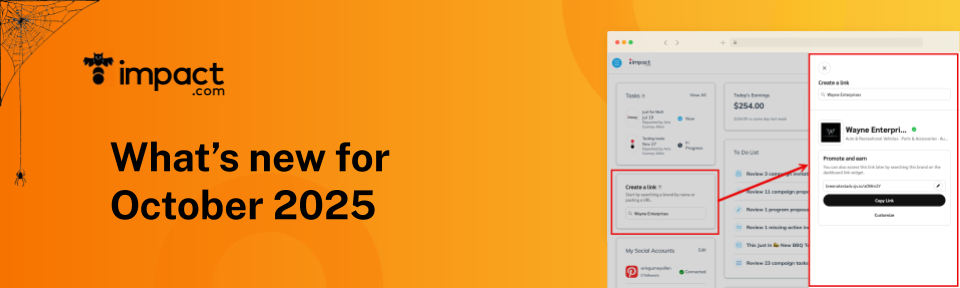
Coming soon: a better way to grab links
If you want to make money as an affiliate or creator, you need tracking links. Those links tell our platform that you referred a given customer and you should get credit when they buy something.
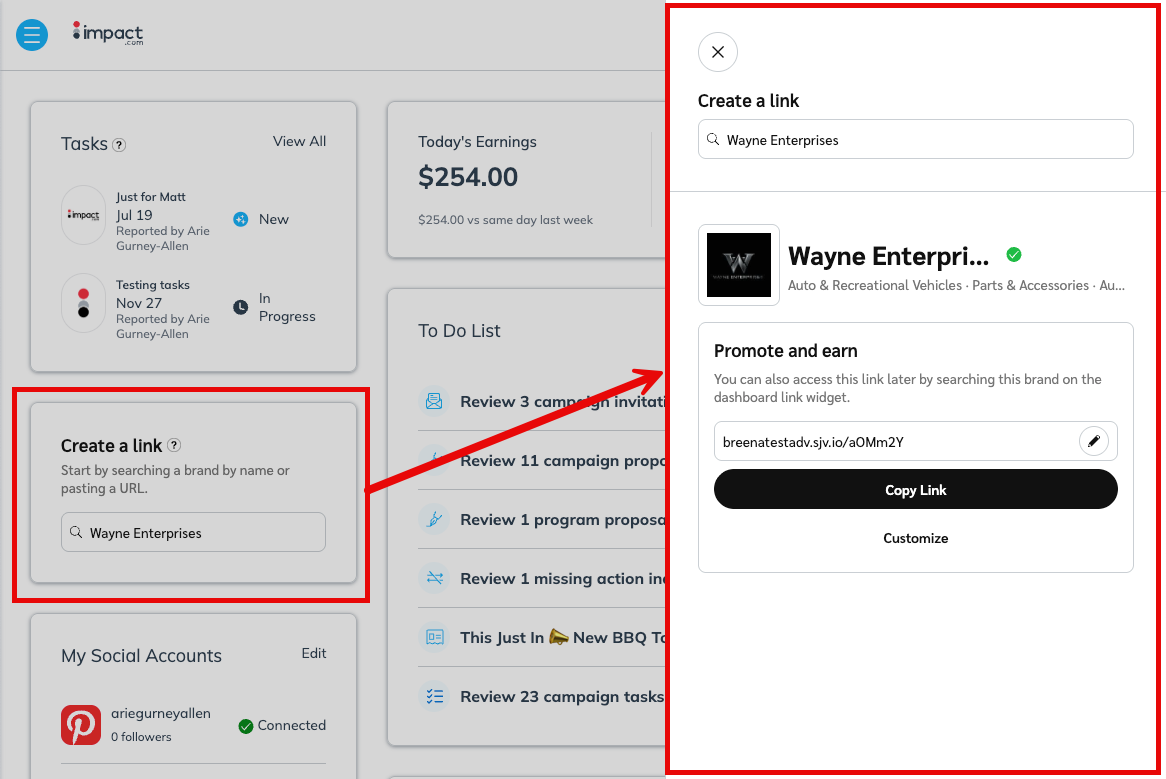
To help you find those links faster and more easily, we will soon be rolling out a new version of the Create a link widget. Here’s why we’re excited about the new version:
The search functionality now looks for a brand’s URL and name — instead of just their program name.
We’ll save you a click by automatically copying your link to the clipboard as soon as you select a brand from the drop-down search results.
The widget now takes up less space on your dashboard. We moved the advanced options into the new slide-out panel that will appear on the right side of your screen. Click “Customize” to see those options.
The widget and slideout are now mobile-friendly for on-the-go link creation.
If you’re using our new (free!) Trackonomics Essentials add-on, you can use the widget to create links for any of your connected networks — not just impact.com.
We will be rolling out this new link creation flow over the next few weeks, so keep an eye out!
Ensuring fair attribution: new Stand-Down policy for software-based publishers
In this release, we are rolling out a new Stand-Down policy that dictates how browser plug-ins and software behave when other affiliates or creators are already present in the consumer journey. You can read the policy here. This policy is designed to ensure fair and accurate attribution and applies to every brand and partnership on the impact.com platform.
When a browser plug-in or software application sees this parameter, they will know to stand down and not activate their services to the consumer. The stand-down period lasts for 30 minutes or until the browser session ends. Publishers using this type of software must be approved by impact.com and follow additional requirements to ensure full transparency and user consent.
We are also adding an all-new capability to help affiliates and creators signal browser plug-ins and other software to stand down and not claim credit for a referral. Now, when a shopper clicks on a tracking link, impact.com will automatically append the parameter “afsrc=1”. This is done during the redirect, which means that even existing links will get this parameter appended and you will not need to append the parameter manually.
While many of our brands already have their own Stand-Down policies in place, we believe that implementing a standardized policy will improve transparency and accountability and create stronger affiliate partnerships overall. We will be rolling out the Stand-Down policy the week of October 20th, and it will be enabled by default for all programs. Brands will have the option to disable this policy globally; if one of your brands does so, you will receive a notification.
See which contacts have Campaign Terms in the List Contracts API
To help you see which of your contracts contain Contract Terms, we’ve added a new flag to the List Contract API response. You can now see HasCampaignTerms: true or false.
Finance Tools Just Got a Major Upgrade!
We've rolled out powerful updates to your finance tools, making your data clearer, faster, and simpler to manage than ever before.
1. Earnings Report
Your Earnings Report (Finance→Earnings) has leveled up to provide better clarity, especially for historical analysis and complex invoicing.
Who's Invoicing Who? We've added an Invoice Entity column to clear up any confusion. This tells you precisely which entity is handling the invoicing (remember, Brand refers to the entity you engage with in the Contracting system).
We've enabled the Deaggregation of data feature, giving you the most detailed look at your performance possible.
Need to look back? The report now offers a strong historical view, allowing you to easily analyze the current year plus the two preceding calendar years.
2. Pending Earnings
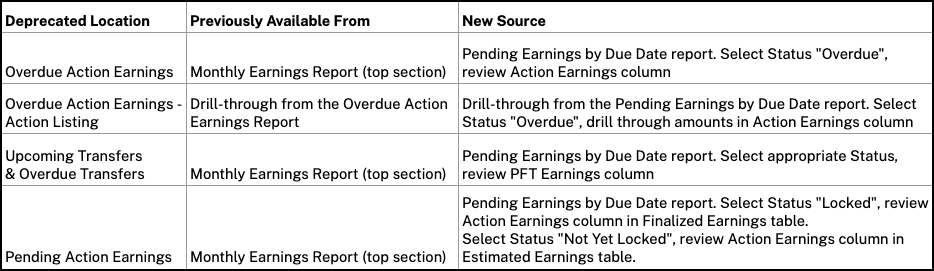
We've retired the old, scattered access points and streamlined your pending transaction data into one single, powerful report.
All detailed pending data now runs through the new, comprehensive Pending by Due Date Report.
Instant Drill-Down: Access is quick and seamless:
Find a new link on the top right of the main Pending screen.
Links inside the transaction detail slide-outs now direct you here automatically, applying the correct filters for you.
Note: The old, separate drill-through reports for pending detail are no longer available. All detail is now accessed directly from the Pending screen.
3. Report Consolidation
We've consolidated several old, superseded functions into the new, improved reports. This is all about ensuring data consistency, centralizing your earnings, and automatically applying filters for faster results.
Partnerships Experience Academy: new (free) courses!
Managing Content and Creative Assets for Partners: Juggling multiple products on impact.com? This course will help you work smarter, not harder, guiding you through faster, easier ways to manage product data, tracking links, and campaigns seamlessly.
You’ll learn to download product feeds at scale, manually, via FTP, or through the API, and manage deals and assets like a pro. You’ll also discover how to use APIs to pull campaign details, generate tracking links, and dynamically update site content. Less busywork, more results, and partnerships performing at their peak.
Advanced impact.com Settings for Partners: Get ready to elevate your impact.com partner account with Advanced Settings! This course equips you with the tools to keep your account secure, manage users, and update key business information with ease.
You’ll learn how to merge and link multiple partner accounts, handle tax documents, and customize a variety of account settings to fit your needs. From managing your user profile to optimizing every detail of your setup, you’ll gain the confidence to run your partner account like a pro, ensuring your profile is fully prepared for long-term success in the partnerships channel.
Advanced Data Reporting and Utilization for Partners: Ready to level up your reporting with impact.com? Go beyond basic tracking and discover how to make data work harder for you.
In this course, you’ll learn how to track results with greater accuracy, customize and automate valuable reports, and choose the right data collection methods for your reporting needs. By the end, you’ll know how to streamline workflows, uncover powerful insights, and make smarter, data-driven decisions that fuel growth and maximize your impact.
