- DATE:
- AUTHOR:
- The impact.com team
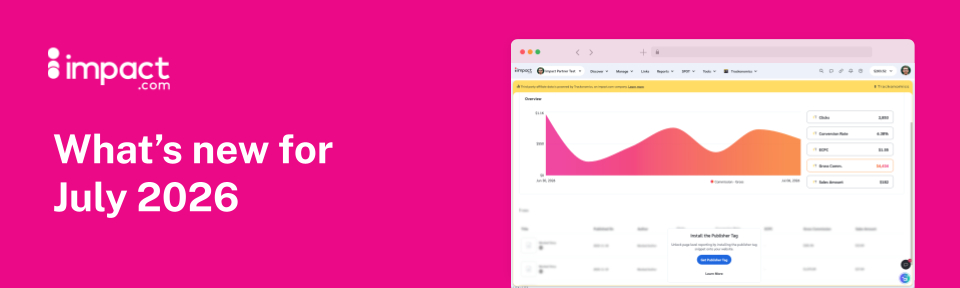
ask impact all your toughest questions, see which articles are driving the most revenue, and more
ask impact V2
You may have noticed the "ai" button down at the corner of your dashboard. That's ask impact, and it's just had a major glow-up. With this release, we've upgraded it to V2 and removed the "beta" label — so you know it's ready to handle whatever you throw its way.
V2 is a full rebuild, faster, smarter, and context-aware in a way the earlier version never was. It knows your account, your earnings, your programs. Ask it something and you get a real answer, built on your actual data.
We have introduced a few new capabilities based on feedback, such as:
Finance Support gives you live, accurate payout and eligibility details in chat. Go ahead and ask “When am I getting paid?” and ask impact will provide you with a detailed breakdown with the exact amount and date.
Product-enriched creative content turning products from your joined programs into ready-to-publish content, with tracking links, prices, commission estimates and images already included.
Program recommendations come with a match percentage. Click the lightbulb or ask “why is this program a good fit?”. You will get a verdict, strengths, concerns, and recommended steps to take next.
The model that powers ask impact has been upgraded so every existing capability runs noticeably faster, with sharper analysis and more accurate answers than V1.
A few things worth trying right now:
Performance analytics - Ask how your programs are tracking, where you're growing, what's dropped off. ask impact reads your data and gives you something to act on, not just a number to stare at.
Full screen mode - Switch to full screen and it becomes a proper workspace. Better for research, better for anything that takes a real conversation.
Chat history - Your conversations are saved. Pick up where you left off. Build on what you already asked. No starting from scratch every session.
Take Me There - Get the answer and land directly on the platform page where you act on it.
Industry Expertise - Partnership marketing strategies and best practices tailored to you, surfaced in context, not buried in a course library.
ask impact V2 isn't just a better help search. It navigates the platform, drafts content, pulls live finance data, deep-links to the right screen, and explains its own recommendations on demand. The shift is from answering questions about your account to actively helping you grow it. Try it and let us know what you think.
A Simpler Way to Get Around
We've rebuilt your trusty navigation bar (aka the "nav bar") from the ground up. You'll now see five tabs: Discover, Manage, Links, Reports, and Tools.
The biggest change is Manage. It's a new home for everything related to your brand relationships, Invitations, My Brands, My Products, Brand Creatives, Deals, Promo Codes, Brand Widgets, Surveys, Compliance, Resources, Vanity Links, and Requests, all in one place instead of scattered across separate tabs.
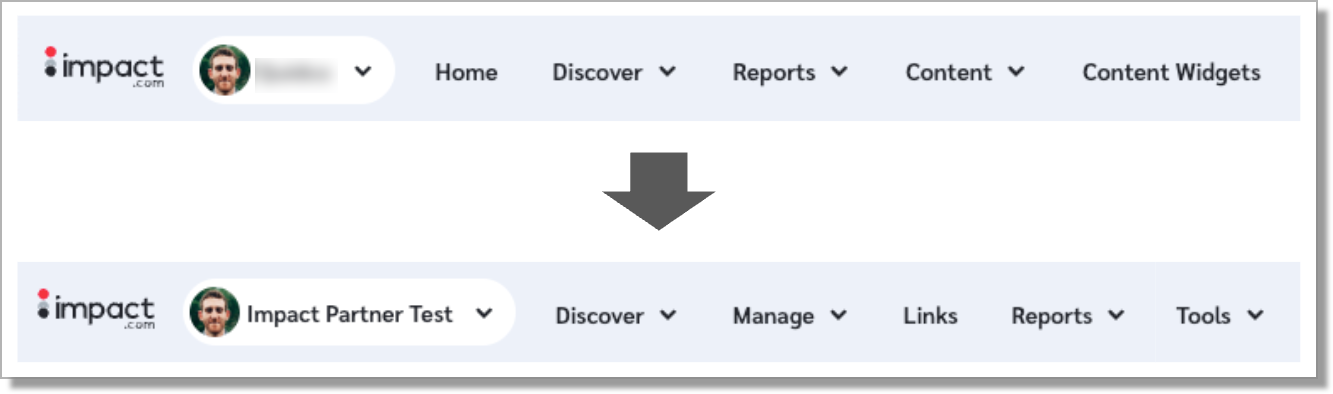
A few things you'll want to keep in mind:
The Home button has been removed, but your dashboard hasn't gone anywhere. Click the impact.com logo to get back to it.
Content and Content Widgets now live inside Manage, as Brand Creatives and Brand Widgets.
Surveys moved into Manage too.
The Reports section is unchanged: same reports, same place.
Tools is new, a dedicated spot for utilities going forward.
Search, messages, notifications, help, balance, your profile, and account switching all work exactly like they did before.
Fewer tabs to hunt through, one place for everything brand-related, and room for new features to slot in without the nav bar growing every time.
Note: We’ll be rolling this out in phases, so you may not see the new nav bar right away. Keep an eye out!
"But wait," you protest. "You never told me about that new 'Links' item!" Good catch. Read on and we’ll tell you all about the new Destinations page that lives under "Links."
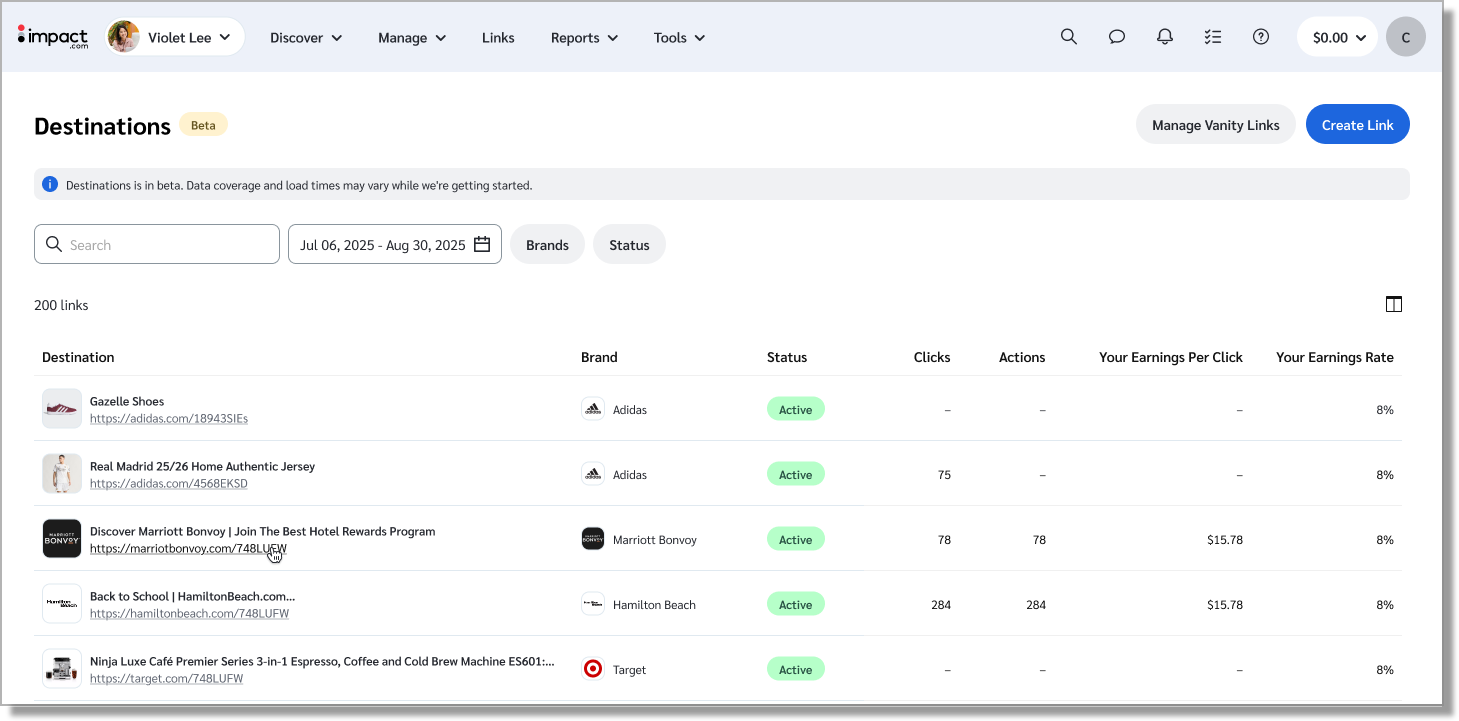
See all your Destinations in one place
Many publishers and creators have told us that it can be hard to keep track of all their links. We built the Destinations page to give you a single view of all the unique pages you’re promoting — so you can see at a glance all the brands, products, and landing pages you’ve sent traffic to.
For instance, let’s say you’ve been promoting ACME products. Do you generate higher earnings per click by sending your readers straight to the Turbo 9000 Rocket Boots product page, the “Roadrunner Hunting” category page, or the ACME homepage?
Now you’ll know, and you’ll be able to optimize your efforts, sending more traffic to the pages that tend to produce better results.
The new Destinations page will only be accessible via the Links item in the new top nav, which, as we mentioned above, is being rolled out in phases. We won’t blame you if you start compulsively refreshing your browser, but please bear with us as we work to get this in everyone’s hands as soon as possible.*
*Psst! We’re aiming to have this rolled out to everyone by the end of July, but changes like this can sometimes be complicated, so don’t hold me to that, and don’t tell my product manager that I said anything.
See which of your articles earn the most — across every affiliate network
If you publish a lot of content, like reviews, buyer’s guides, and listicles, you probably end up including the same product within multiple posts. And while it’s easy enough to see which brands or products are performing well, it’s a bit harder to tell which specific pieces of content are driving that performance.
Sure, you can infer performance based on traffic or engagement, but that’s not the same as knowing exactly how many pairs of shoes that “Best Gifts for Your Marathon-Loving Grandmother” article sold, and whether it drove a higher EPC than “I Ran 10 Miles Every Day for a Week in my Crocs Just to See What Would Happen”.
The new* and improved Publisher Tag is here to plug that gap. It’s a lightweight JavaScript snippet you can paste into your website’s HTML. Once you add it, it will give you a full view of which pages are paying your bills.
And if you’re promoting brands across other affiliate networks (that is, beyond impact.com), we’ve got great news: it’ll give you all the same page-level data for those other networks as well. You just need to activate the free Trackonomics Essentials add-on. Once you do, you can head to the Overview by Story report to see exactly how each article is performing, across all your networks.
Adding the tag is also an easy way to verify your media property — and that's more exciting than it sounds. Our partner recommendation system prioritizes publishers whose properties are verified, so a verified site gives you a much better chance of getting matched with brands looking for partners like you.
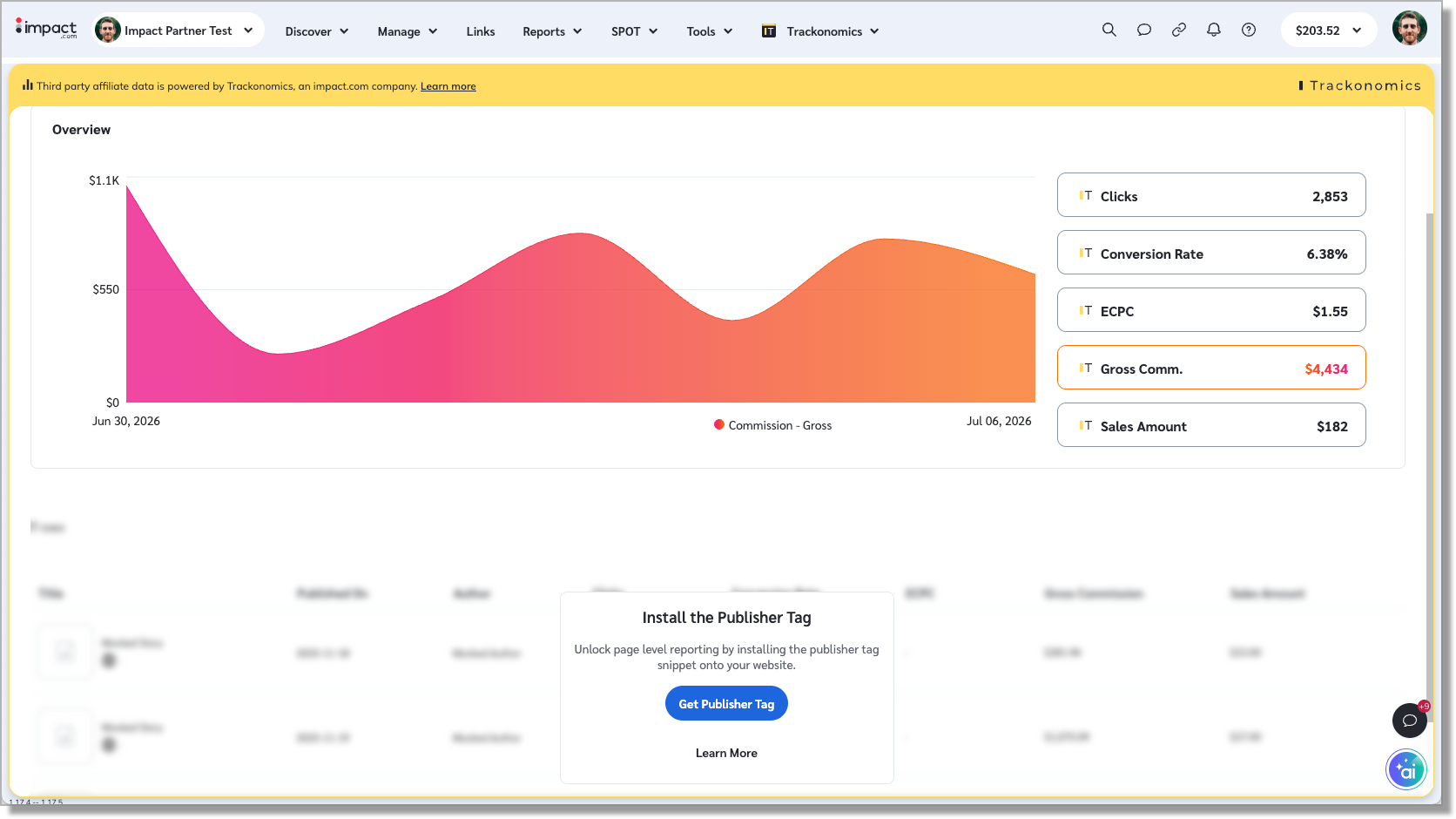
P.S. This feature is specifically relevant to anyone who promotes brands on their own website. If you're a creator who promotes brands on your social properties, this won't work for you. But don't fret! We've got some fun stuff in the works for you too. 
*We’ve had a publisher-facing JavaScript tag for a while now, but we recently took it down to the studs and began rebuilding it into something more useful. We’re already working on additional features, like the ability to automatically convert relevant organic links into affiliate links, so you’ll never miss a chance to earn, even if an editor gets so carried away with their long-distance-running-in-Crocs story that they forget to include the right links.
Want to download your Earnings History report? Now you can.
Your earnings data now has a home outside the platform screen. Head to More Reports → Finance → Earnings History to download the full report, with filters by brand and by month, and a clean split between Finalized and Estimated Earnings, so confirmed revenue and in-progress totals never get mixed up.
Until now, exporting pending earnings meant working inside the dashboard and rebuilding the numbers to fit internal invoicing and payment processes on the other end. Now that data travels with you, ready to plug straight into the reconciliation workflows you already run.
Search for products by brand name
You can now search for products by the brand name of the product and filter by the top product brands in the results. Search “Adidas” and see every Adidas product across every retailer, not just the ones from a single retailer. This is available for an initial set of retailers and brand names, and will grow over time.
Until now, brand-level browsing meant working retailer by retailer, hoping the one you needed had the products in stock or listed the way you expected. Now the marketplace surfaces the brand itself, pulled together from every retailer carrying it. This makes it faster to build offers or content around specific brands your audience already trusts, and less time spent stitching together results from scattered catalogs.
Manage your media properties in the impact.com mobile app
Your media properties page just got a rework, starting with the thing that was costing people the most visibility: broken connections.
If a social account disconnects, expired login, revoked access, whatever the cause, you no longer have to delete it and start over. Hit reconnect, and you're back up without losing the property's history or its standing in the marketplace.
We've also cleaned up the screen itself. Verification and connection status used to blur together, and that confusion was making properties look less trustworthy or less "ready" than they actually were, which matters when brands are deciding who to work with. Now you'll only see a status prompt when something actually needs your attention. No clutter, just your properties and what's live. Check out this help doc if you want to dive in deeper.
