
Build widgets more easily, see conversion rate by page, and more: Trackonomics September 2024 Release
Widgets are now smarter and easier to build
When you set out to tame the vast universe of data available in your Trackonomics account and harness it towards your own purposes — that is, you decide to build a new widget — it can be a little daunting. With this update, we’ve made two improvements that will simplify that process and get you the insights you need more quickly.
Know what you don’t know: There are a ton of different metrics you can use to create a widget, and those metrics don’t always work well with each other. For instance, if you’re looking at performance by SKU, a column for Impressions wouldn’t make sense. Previously, when our system encountered a situation like that, it would have left the cell blank. But that wasn’t always helpful, and sometimes led to confusion.
With this update we have added logic to clarify this. If a dimension is not applicable for a given row of data, you will see “N/A”. And if we simply don’t know what the value of that dimension is for a given row, you will instead see “Unknown”, followed by the name of the dimension (e.g. “Unknown Page”).
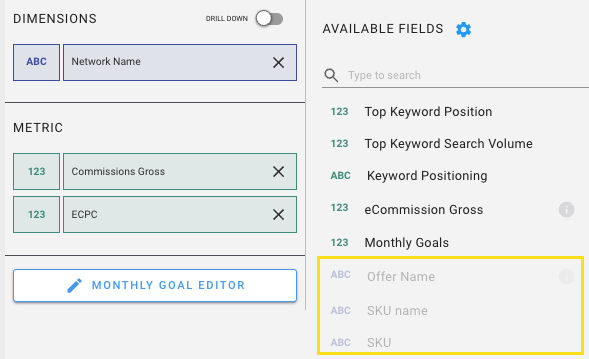
Oh, and we now also gray out all metrics that will not work with the existing Dimensions and Metrics in the widget. So when you’re building a new widget, you’ll see exactly what will work and what won’t -- like so:
So long, data set silos: Previously, when you wanted to build a new widget, your first step was to select which data set you wanted to build that widget on top of. If that choice always made you a little bit anxious, you’ll be glad to know we've removed that step. Our
wizardsengineers didsome magica lot of work to unify several data sets, and the result is that you can now build widgets that pull data from any data set — or even several at once.
We’ll sunset our old Chrome extension later this year — get the new one!
Late last year we announced a major update to our Link Generator (previously known as the Publisher Extension). We kept the old extension running in parallel so that everyone would have time to switch over at their own pace. A bit later this year, we’ll complete the process and let the old version sail off into the sunset.
If you haven’t tried the new Link Generator yet, let us refresh your memory about what makes it better than the old one. Besides the simpler login process (you no longer need an environment code) and the refreshed look and feel, we’ve added several new features:
ChatGPT integration: brainstorm products for reviews and listicles using ChatGPT, then click through and find the perfect items from your joined merchants.
Global offer search: quickly find out which brands are on which networks, what their payout rate is, and whether you’re currently joined to their program. Or search for relevant brands by retail category, such as Beauty, Fashion, and more.
Global product search: See which brands carry a given item, and what commission rates to expect from each one. Filter results by region (


 ), language, product category, and specific merchant(s).
 Commission rate comparison: When you create an affiliate link, you can now see which networks can power that link and how your potential commission differs between them.
SubID templates are now easier to set up: Improve tracking and attribution by adding custom SubID templates. We normalize the SubID structure across all networks so you can just set them up once and track correctly no matter the network.
Trackonomics users can download Link Generator here for the low price of free. Give it a try and let us know what you think!
See Page Views in your Scorecard
We have enabled the Page Views metric within the Scorecard widget. This will give you a much more accurate look at your impressions than the old “Impressions” metric does. That’s because “Impressions” is sourced directly from the affiliate networks, and they don’t typically have a great way to measure that. The “Page Views” metric provides a much more accurate view of how many times a given page has been loaded.
And before you ask — yes, the Page Views metric was available elsewhere in the platform already. Now it’s available in the Scorecard widget as well!

Download widgets more easily
A live dashboard is nice and all, but sometimes you just want to download your data and use it offline to impress your boss, wow your crush, or respond to a pesky subpoena. To that end, we have made several improvements that will make it easier for you to reliably download widgets from the dashboard.
Easily determine conversion rate by page
Typically, if you wanted to know how many conversions you drive in a given time period, you would use the “Actions” metric. But that also includes "actions" like bonuses and paid clicks. We have added the “Orders” metric to page- and transaction-level reporting to provide a better view of exactly how many conversions were driven.
Without getting into too much detail, this metric aggregates by Order ID and validates that each order had a sale value attached to it. As a result, you’ll now find it easier to accurately determine conversion rate by page, without all those non-sale “actions” throwing things off.
Stay abreast of action updates
When actions are updated (due to an item being returned, for instance), that can throw off your reporting by a little bit. Previously, our system just updated the action in the background, to match the new value sent from the network. Now, we have added the “Update Date” and Update Time fields, which will show you when a given action was last updated.
Updated integrations:
PartnerAds: We now support link generation for the PartnerAds network.
Skimlinks & Commission Factory: We have added specific transaction types to Skimlinks and Commission Factory data, which will help you to better understand your conversion data from those networks.
Amazon Helper: Our Amazon Helper provides a bridge to pull your data from Amazon into your Trackonomics account. Amazon made some changes that made this difficult, but we’re back up and running. Note that Amazon Helper uses the most recent version of our Chrome extension. So if you don’t yet have that, you should probably install it!
