- DATE:
- AUTHOR:
- The impact.com team
Creator benchmarking, an AI-friendly Integrations Hub, and more
Grab a coffee and get comfy. This one's full of exciting updates across Performance, Creator, and Advocate, including a few that many of you have been asking us for.
Performance & Platform
FYI: Some of the updates in this section are specific to Performance programs, but many of them are relevant across our whole platform.
Benchmark your creator performance against your vertical
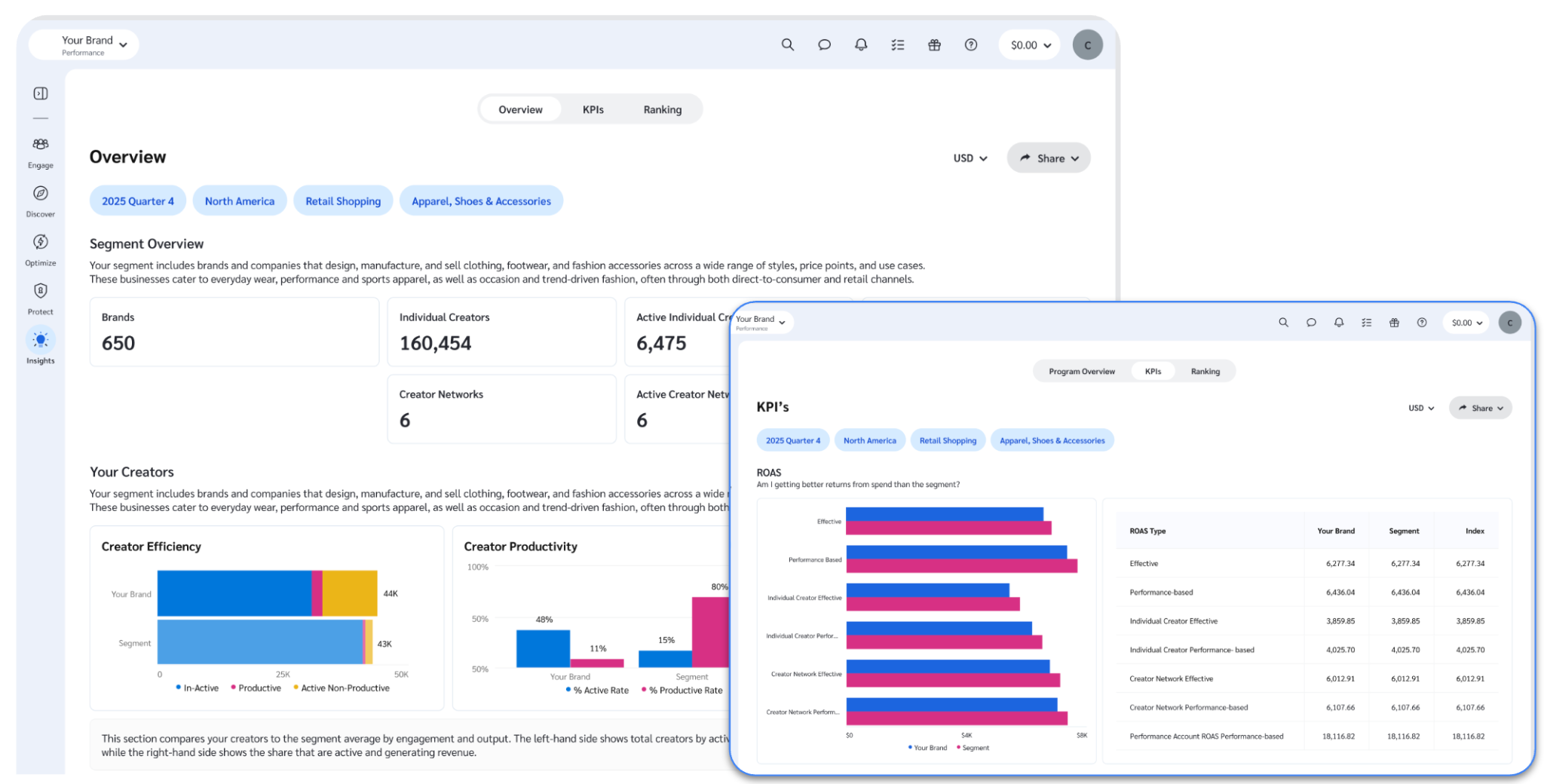
Setting creator commission rates can feel like guesswork. So can figuring out which creators you should be working with but aren't. Creator Benchmarking gives you the competitive context to fix both: see how the creators in your program compare on commission rates, ROAS, and partner mix to creators in similar programs across your vertical.
Why check your benchmark reports?
Know if you're paying right. Compare your effective commission rates and ROAS against the average for programs like yours. Spot the partner relationships where you're overpaying or underpaying, and adjust.
Find creators you're missing. Surface productive creators working in your vertical who aren't yet in your program, with the performance data to know they're worth the outreach.
Set targets you can defend. Use the benchmarks to set efficient commission rates and data-backed performance goals.
Creator Benchmarking is only available to eligible accounts that meet the vertical, regional, revenue, and partnership criteria. The reports cover the creator partners in your program, whether they're in your Performance (affiliate) program or a dedicated Creator program. Included with Essential, Pro, and Enterprise plans in the Competitive Insights section of your account. For more information about the reports and how to use them, please check out our help documentation.
Manage your partners more easily with the upgraded My Partners page
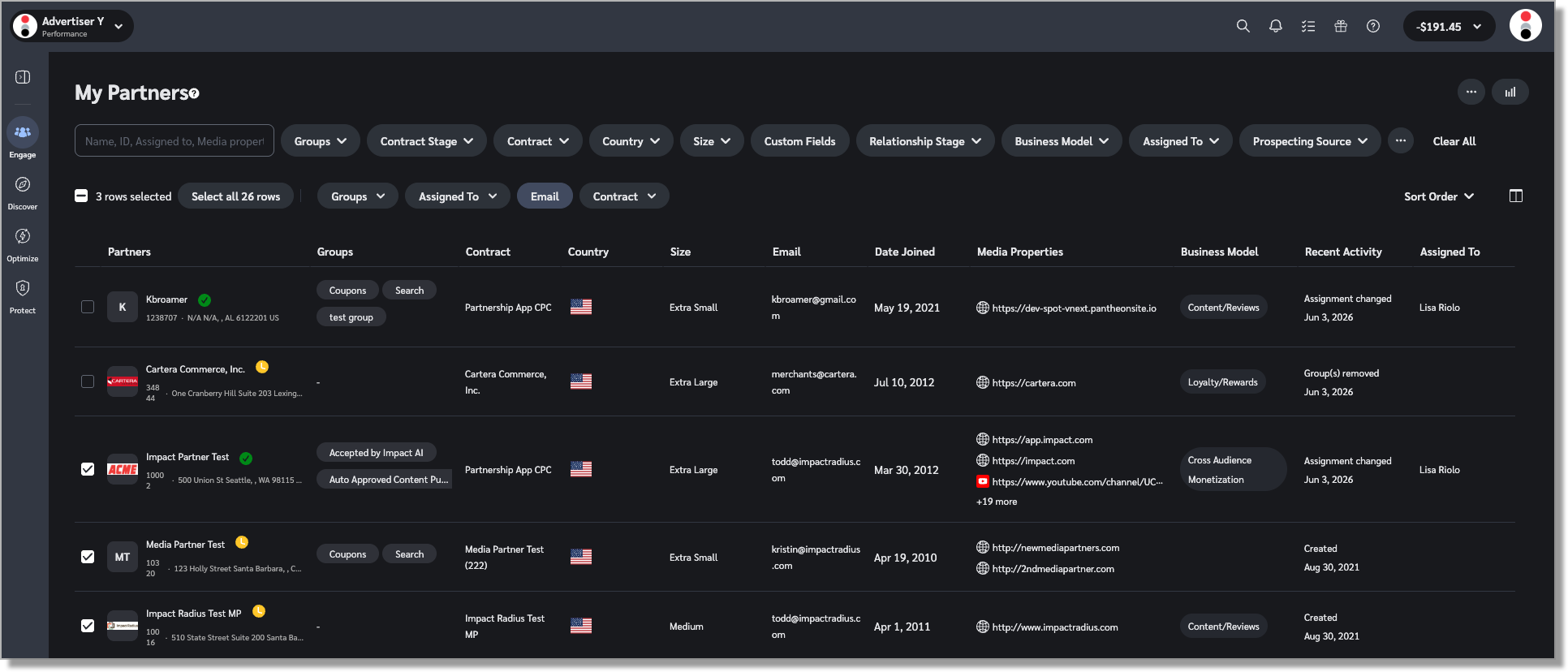
We’ve made some big changes under the hood of the My Partners page, and those technical upgrades have enabled us to make some long-asked-for additions, including new filters, new columns, and new bulk actions. You can even choose “select all possible rows” to perform bulk actions on as many as 20k partners at once.
We’ve added a confirmation dialog when you perform a bulk action, so you don’t accidentally change all your partner groups when you thought you were just filtering your view.
We’ve updated the help article with all the new details, but we’ll share one use case that’s particularly fun. If you’re using Surveys, you can now filter and add columns for your partners based on Custom Fields, to group your partners by their answers to any survey question, assign them to a specific account manager, or send them an email based on their responses.
On the flip side, there are a few things that were available in the legacy version that are not currently available in the new one:
Terms updates filter
State filter (this will be replaced with a Location Radius filter — coming soon)
Bulk edit partner custom values
Log in to the partner’s account (not available for all users)
In addition, the new My Partners page does not support Saved Views. But if you use Saved Views as a way to “bookmark” various partner cohorts, fear not! We will soon integrate this with Segments, so you can define Segments based on a combination of filters, and then use that Segment to filter other pages (like Prospects or Applications!) or power a workflows or newsletter.
The upgrades we’ve made to this page give us a lot more freedom when it comes to adding new features and functionality. So if you miss any of the features that have been removed — or you have an idea for a new field you’d like us to add — please let us know!
One final note: we will be rolling out the new My Partners page in phases. If you don’t want to wait, reach out to your CSM or our support team and we can include you in an earlier rollout group.
Streamline workflows and build faster with the new Integrations Hub
Integrating with the impact.com platform just got a lot smoother. We completely redesigned the Integrations Hub to deliver a faster, more intuitive developer experience.
The URL remains exactly the same (integrations.impact.com), but everything inside is engineered to help your technical teams deploy, test, and optimize workflows with ease.
What you get with the new Integrations Hub:
Built for the AI era: Your developers can enable preferred AI tools to interact directly with our documentation to build and troubleshoot code instantly.
OpenAPI specifications: All API reference documentation now fully supports OpenAPI standards, giving you structured, predictable access to our platform endpoints.
In-hub API testing: Eliminate the guesswork by testing endpoints directly within the hub environment to see exactly how data flows before going live.
A modernized experience: A clean, intuitive design makes finding technical answers quick and effortless, saving your team valuable time.
Ready to explore? Check out the all-new Integrations Hub today!
PS: Our soon-to-be-released MCP server is a key part of this AI-forward direction, and we want your advice! We would greatly appreciate it if you could take this two-minute survey to share your thoughts and help us make the MCP as useful as possible.
Bring Connected TV into your partner mix
Connected TV (CTV) partners can drive strong performance, but they've been hard to fold into a partnership program. Since there’s no click when a user watches your CTV ad, it has historically been tough to see how that touchpoint fits into each conversion path. As a result, there has not been a good way to deduplicate conversions credited to CTV against conversions credited to your other partners.
To solve that problem, we’ve developed an in-house CTV attribution solution. This means that you can add streaming TV partners to your program the same way you'd add any other partner type, and we'll deduplicate credit across your program, so you see exactly how CTV fits into your partner mix, without worrying about double-paying.
This feature is currently in beta, and we’re looking for a few brands who want to receive early access. If you’ve been looking for a good way to add CTV into your partnership program, fill out this form and we'll help you set it up!
Amazon Seller: CPC payouts now available
CPC payouts are a great way to engage premium publishers who won't work on a CPA basis, or to fairly reward top-of-funnel partners that last-click CPA payouts traditionally undervalue. That's why we've introduced CPC payouts for Amazon Seller programs: you can pay partners for the clicks they drive, alongside any sales they generate.
Why this matters:
Pay the partners doing the real upper-funnel work. Content creators and review sites introduce shoppers to your brand long before anyone clicks "buy." Last-click attribution underpays them. CPC fixes that and keeps those valuable partners engaged.
Recruit publishers who won't run on CPA alone. Premium media and high-value content sites often need click payouts to participate at all. CPC opens those conversations.
Set the rules you want. Pay different rates for different click types or traffic sources. Cap your spend with click or payout limits. You decide which clicks earn payout and at what rate.
Get started by configuring CPC payouts in your Amazon Seller program today.
We’re making it easier to log in to impact.com
If you have multiple impact.com accounts, or you can never remember whether you should log in via Single Sign-On (SSO) or username + password, this update is for you. We have streamlined the login process, so you now just need to enter your email address. You will then be prompted either to enter your password or login via your SSO provider — no more guessing!
Now, if you’re one of the old-timers with multiple accounts associated with a single email address, we will ask for a username. And if you’re not sure which username to enter, we’ve still got your back. We recently improved the “forgot password?” process, so you can easily get a list of your accounts and reset the password for the right one.
Streamlined SSO options for new users
As part of our ongoing quest to simplify the login process, we are removing some of the less-common SSO options that have been available for new users. So when you add a new user to your account, they will not see the option to login via Facebook, X, or LinkedIn. Anyone who currently uses one of those login providers will still be able to log in as usual.
Manage Surveys & Custom Fields via API
You can now manage Surveys and Custom Fields programmatically through impact.com's public API. Previously, you had to do this one piece at a time in the UI.
For Surveys, the API covers the full lifecycle: list, retrieve, create, update, delete, upload a cover image, and pull survey responses by survey or partner. For Custom Fields, you get the same control: list, get, create, update, and delete.
This is a major workflow improvement if you're building integrations, automating onboarding flows, or syncing partner data with external systems. And of course, having all this available via API means that you can have your favorite AI tools handle a lot more of the process.
We’re still finalizing the technical documentation for these endpoints, so keep an eye on our integrations portal — we’ll have that published soon so you can plug in.
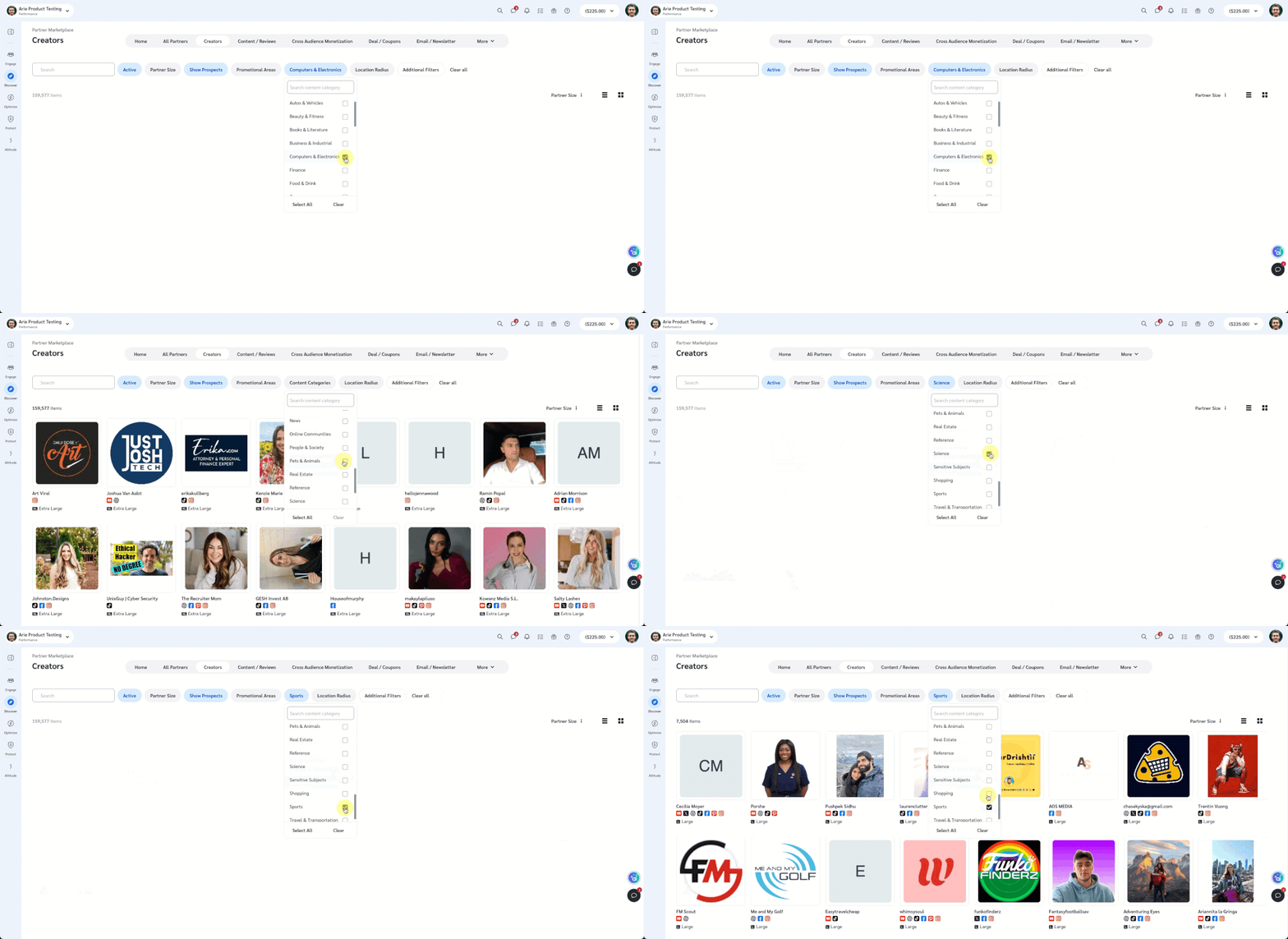
Find new partners in your niche with Content Categories
If you’ve ever filtered the Partner Marketplace by “Categories”, you may have noticed that the results were…well, let’s just say they were not always super helpful.
We are now generating those content categories more intelligently, based on the actual content found in each partner’s media properties.
So, if you want to find some new partners who write content relevant to your product categories (and who wouldn’t?), head over to the Marketplace and give the new Content Categories filter a try!
Note: this update applies regardless of whether you're accessing the Marketplace through a Performance or Creator program.
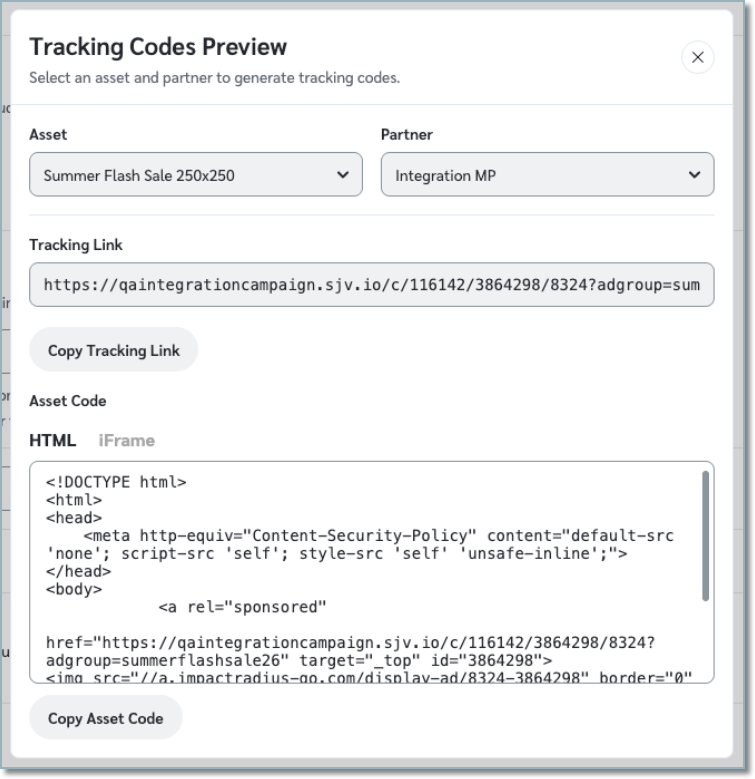
Easier access to tracking links and asset code
We’ve improved how you access and copy tracking links and asset code in the Send Asset experience.
You can now preview assets’ codes before sending, choose the specific partner and asset you need, and copy either the tracking link or ad code in your preferred format (HTML or iframe). This update removes previous limitations and makes it faster and easier to get the exact code you need.
New ways to find and manage assets in your Asset Library
We’ve made two updates to the Asset Library. You can now filter by Partner and Group, so you can quickly see which assets are available to specific partners or groups. And if you need to act on everything at once, the select-all checkbox now includes an option to select all rows across all pages, not just the ones currently visible. From there, export to CSV or run any bulk action across your full asset set.
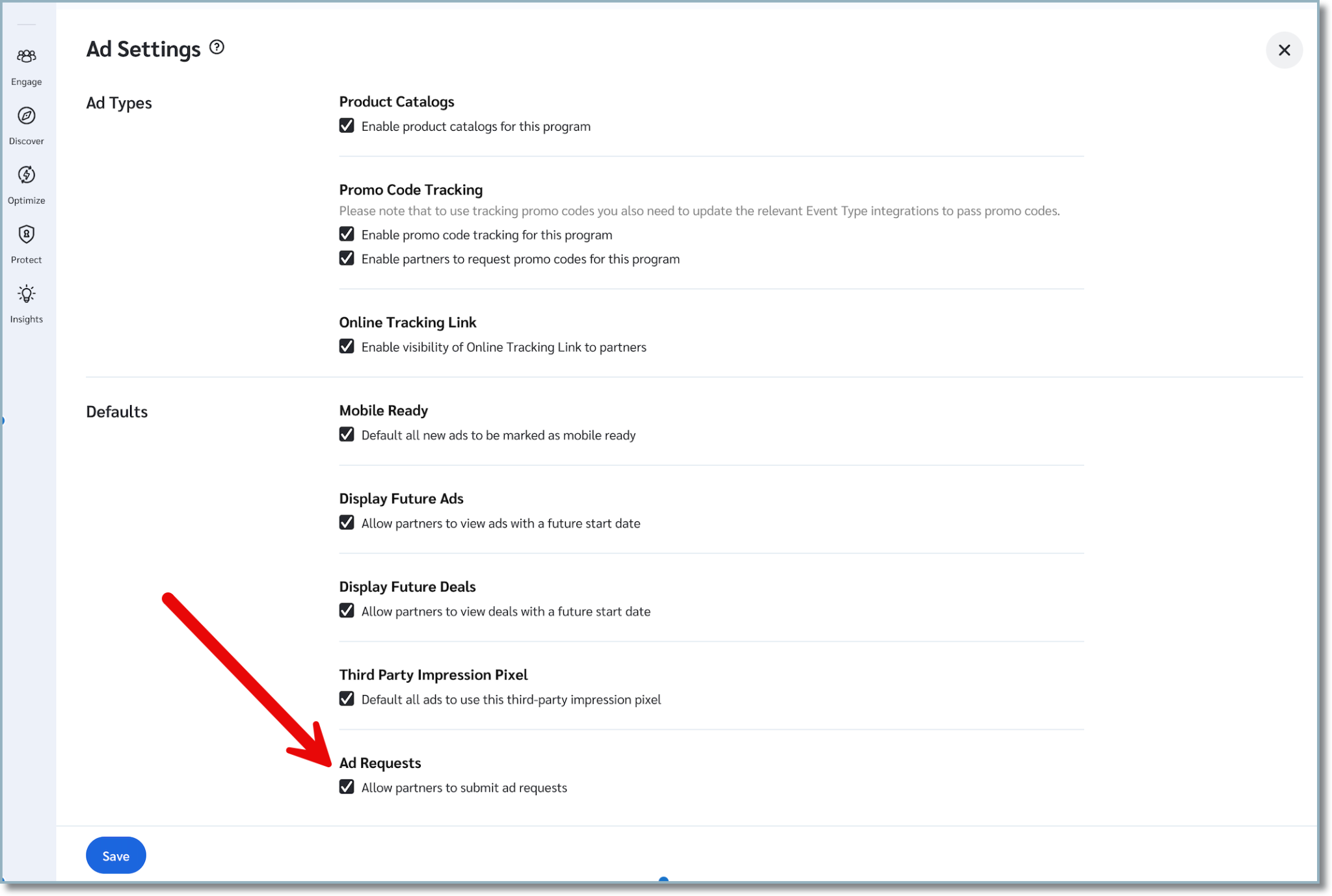
Control ad requests across your entire program
You now have a single setting to control whether partners in your program can submit ad requests. Previously, the ad request toggle only applied to branded console partners. Now you can manage it for everyone at once. Turn it on for all partners, off for all partners, or keep the existing branded console setting to handle each group separately. Find it in your ad settings.
The impact.com plugin for Shopline is now in open beta
Our plugin for Shopline makes it easy to recruit, track, and manage partners that want to promote your online store without needing coding knowledge. Follow this step-by-step guide to learn about the straightforward integration process.
Coming soon: an upgraded UX for branded partners
As you may be aware, we recently rolled out a new look and feel for our platform. We released the new user experience (UX) for publishers and creators as well, but we excluded partners that are joined directly to a program that uses custom branding. So if you have configured custom Partner Console Branding, your direct partners have not yet received the new experience.
The next phase of our rollout will be to apply the new platform UX to these “branded” partners as well. We will not be making any major, functional changes to partner dashboards at this stage, so we don’t expect this update to cause any significant disruption. That said, things will look a bit different, so you may get questions from your partners. If you do, please direct those questions to our support team. Your partners can access support the same way you can — by clicking the question mark icon at the top right corner of the impact.com platform.
Note: We will not be including the Theme Switcher (aka Dark Mode) in this phase of the rollout. We’re taking our time with this to make sure we can improve the partner experience, while preserving your custom branding.
Creator
Heads up! This section includes any features that are specific to Creator programs. Many of the new features listed above under "Performance" do apply to both Performance and Creator programs — so if you skipped down here, you may want to skip back up to get the full story.
Automatically track creator content with campaign hashtags
Coming soon! Tracking creator content is about to get easier. You can now define campaign hashtags during campaign setup and have creator content automatically associated with the appropriate campaign when those hashtags are used. By reducing the need for manual content submissions, you can spend less time managing campaign content and gain a more complete picture of campaign performance through automatic content tracking and reporting.
Please note: this feature requires your partners to have connected their social accounts via OAuth. Additionally, we should note that TikTok is not currently supported.
Customize how creators submit draft content
You can now choose which submission methods creators can use when submitting content for review. Whether you prefer direct file uploads, URLs, or a combination of both, you can configure the options that best fit your review process. You can also add custom URL submission instructions that creators will see when completing their deliverables, helping ensure content is shared in the format your team requires. Learn more in the help article.
Creator content & campaign performance, now in one unified report
Managing creator partnerships involves tracking many moving parts. Until now, that meant jumping between four separate reports (Performance by Campaign, by Post, by Platform, and by Creator) to get the full picture. But not anymore!
The new Creator: Content & Campaign Overview report consolidates content and campaign data from these four reports into one unified place. You can see total clicks, actions, revenue, action cost, flat fee, and total cost at a glance, then drill down by creator, campaign, social platform, or individual post. No switching tabs. No reconciling numbers across reports.
The four reports this replaces — Performance by Campaign, by Post, by Platform, and by Creator — will remain available for now, but will eventually be deprecated. If you rely on any of them, make the switch to Content & Campaign Overview today to avoid disruption in the future.
New actions for easier partner management in My Creators
Did you see our note above about the new My Partners page? If not, scroll up and give that a read real quick. It’s ok, we’re not going anywhere.
Ok, now that you’re up to speed, we can tell you that all those updates apply to the My Creators page as well. So now you can add as many as 20k creators at once to a group, assign them to an account manager, or update their contracts.
To help you use your newfound power responsibly, we’ll show a confirmation dialog when you initiate a bulk action.
Advocate
Improvements to the reward payout experience for advocates
We’ve made several updates to help advocates more easily activate and redeem their rewards. Reward notification emails now provide clearer payout details and recurring reminders if payout setup is incomplete, helping advocates understand what they’ve earned and what steps remain. We’re also introducing an earlier payout setup step during signup to help streamline reward processing and reduce delays in getting paid.
Links people trust and click
Advocates can now personalize their own shareable links with vanity URLs, making it easier to create links that reflect their identity and build trust with their audience. This self-serve experience lets customers quickly customize and update their links directly within the sharing flow, with smart validation to ensure links are available and brand-safe. This helps create more recognizable, memorable links that can help increase clicks and conversions while making it faster and easier to start sharing.
That's all we've got for you today, but since you're clearly the intelligent, charming sort of person who reads all the way to the bottom of release notes, I'll let you in on a little secret. We're hosting a little shindig in Austin next week, and we've saved all the biggest, most exciting features so they can be announced there. So I guess what I'm saying is...keep an eye out for more cool stuff headed your way soon. But if anyone asks? You didn't hear it from me. 
